Cilium Powered vClusters - Part 3: Tenant isolation with network policies (NetworkPolicy + CiliumNetworkPolicy)

May 27, 2026
|
min Read

Apply network policies to enforce Tenant Isolation between Tenant Clusters. Block cross-tenant traffic and prove isolation with live tests, using both standard Kubernetes NetworkPolicy and Cilium’s CiliumNetworkPolicy.
Goal: Block cross-tenant traffic (tc-gamma→tc-alpha/tc-beta) while keeping intra-tenant traffic working.
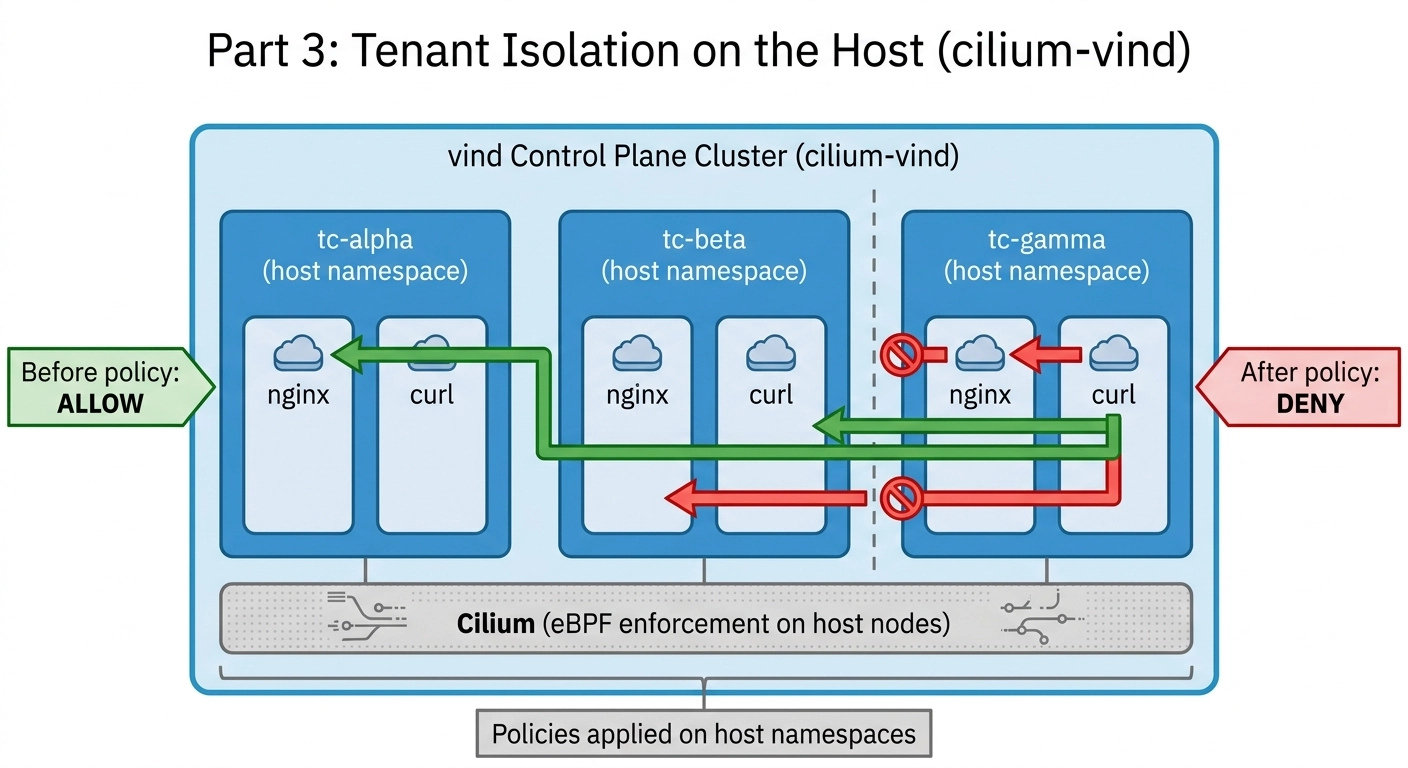
In Part 2, we deployed three Tenant Clusters inside a single vind Control Plane Cluster and proved that all pods get IPs from host Cilium automatically. We also showed that cross-tenant traffic was completely open: a pod in tc-gamma could reach pods in tc-alpha and tc-beta with no restrictions.
Without any policy in place, the network looks like this:
vind Control Plane Cluster
  ├── tc-alpha  (Team Alpha's Tenant Cluster)
  │     ├── nginx  10.244.0.197
  │     └── curl
  ├── tc-beta   (Team Beta's Tenant Cluster)
  │     ├── nginx  10.244.3.250
  │     └── curl
  └── tc-gamma  (Team Gamma's Tenant Cluster)
        ├── nginx  10.244.3.147
        └── curl

tc-gamma/curl → tc-alpha/nginx    (open - no restriction)
tc-gamma/curl → tc-beta/nginx     (open - no restriction)
tc-gamma/curl → tc-gamma/nginx    (open - expected)
Every pod can reach every other pod across all three Tenant Clusters. Cilium is handling the networking, but with no policies applied it allows all traffic by default. We need to change that.
Policies are applied on the host cluster (cilium-vind), not inside the Tenant Clusters.
When a Tenant Cluster pod is synced to the host, it lands in a host namespace that matches the Tenant Cluster name - tc-alpha, tc-beta, tc-gamma. A policy applied to that host namespace controls the traffic of those synced pods.
Example:
# Inside tc-alpha, you see:
kubectl get pods
# NAME    READY   STATUS
# nginx   1/1     Running
# curl    1/1     Running

# On the host (cilium-vind), the same pods appear as:
kubectl get pods -n tc-alpha
# NAME                          READY   STATUS
# nginx-x-default-x-tc-alpha    1/1     Running   ← policy applies here
# curl-x-default-x-tc-alpha     1/1     Running   ← policy applies here
Why apply on the host? Because the real pods live on the host nodes. The Tenant Cluster is a virtual control plane; it has no nodes of its own. Cilium runs on the host nodes, so policies must be applied where Cilium can enforce them i.e. on the host.
The NetworkPolicy resource is built into Kubernetes and works with any CNI - Flannel, Calico, Cilium, etc. It is the most portable option.
This policy uses podSelector: {} to target all pods in a namespace. Inside ingress.from, a podSelector: {} without a namespaceSelector means “allow from pods in the same namespace only.” Any traffic arriving from a different namespace is blocked.
Make sure you are connected to cilium-vind (not inside a Tenant Cluster), then apply:
cat << 'EOF' | kubectl apply -f -
apiVersion: networking.k8s.io/v1
kind: NetworkPolicy
metadata:
  name: deny-cross-tenant
  namespace: tc-alpha        # apply this policy in the tc-alpha namespace on the host
spec:
  podSelector: {}            # target ALL pods in this namespace
  policyTypes:
  - Ingress                  # this policy controls incoming traffic only
  ingress:
  - from:
    - podSelector: {}        # allow traffic ONLY from pods in the same namespace
                             # any pod from tc-beta or tc-gamma will be blocked
---
apiVersion: networking.k8s.io/v1
kind: NetworkPolicy
metadata:
  name: deny-cross-tenant
  namespace: tc-beta         # same policy for tc-beta
spec:
  podSelector: {}
  policyTypes:
  - Ingress
  ingress:
  - from:
    - podSelector: {}        # only tc-beta pods can reach tc-beta pods
---
apiVersion: networking.k8s.io/v1
kind: NetworkPolicy
metadata:
  name: deny-cross-tenant
  namespace: tc-gamma        # same policy for tc-gamma
spec:
  podSelector: {}
  policyTypes:
  - Ingress
  ingress:
  - from:
    - podSelector: {}        # only tc-gamma pods can reach tc-gamma pods
EOF
Expected output:
networkpolicy.networking.k8s.io/deny-cross-tenant created
networkpolicy.networking.k8s.io/deny-cross-tenant created
networkpolicy.networking.k8s.io/deny-cross-tenant created
vcluster connect tc-gamma --namespace tc-gamma --driver helm

kubectl exec curl -- curl -s --max-time 5 <http://10.244.0.197> | grep -o "<title>.*</title>"
kubectl exec curl -- curl -s --max-time 5 <http://10.244.3.250> | grep -o "<title>.*</title>"
Expected output (traffic blocked):
command terminated with exit code 28
command terminated with exit code 28
<aside>
What is exit code 28?That is curl's timeout error code. The request did not get a “connection refused” response, it got no response at all. This is how eBPF-level blocking looks: packets are silently dropped at the kernel level before they ever reach the destination pod.
</aside>
# Still connected to tc-gamma
kubectl exec curl -- curl -s --max-time 5 <http://10.244.3.147> | grep -o "<title>.*</title>"
Expected output:
<title>Welcome to nginx!</title>
Tenant Isolation is working: cross-tenant traffic is blocked; intra-tenant traffic flows freely.
vcluster disconnect

kubectl delete networkpolicy deny-cross-tenant -n tc-alpha
kubectl delete networkpolicy deny-cross-tenant -n tc-beta
kubectl delete networkpolicy deny-cross-tenant -n tc-gamma
Cilium has its own extended policy resource called CiliumNetworkPolicy. It achieves the same isolation, but is enforced directly in the Linux kernel via eBPF and unlocks advanced capabilities the standard NetworkPolicy does not have (DNS, HTTP, port+protocol, and more).
NetworkPolicyCiliumNetworkPolicyWho supports itAny CNICilium onlySelector typesPod + namespace labelsPod, namespace, IP range, DNS name, HTTP pathEnforcementDepends on the CNIAlways eBPF (kernel level)Traffic visibilityNoneFull via Hubble (Part 4)
The key field difference is fromEndpoints instead of from.podSelector. In Cilium, a pod is called an endpoint — an entity that Cilium tracks and assigns a security identity to. fromEndpoints: [{}] means “allow from all endpoints in the same namespace.”
cat << 'EOF' | kubectl apply -f -
apiVersion: cilium.io/v2
kind: CiliumNetworkPolicy
metadata:
  name: deny-cross-tenant
  namespace: tc-alpha          # apply in tc-alpha namespace on the host
spec:
  endpointSelector: {}         # target ALL pods (endpoints) in this namespace
  ingress:
  - fromEndpoints:
    - {}                       # allow ingress ONLY from endpoints in the same namespace
                               # Cilium enforces this at eBPF level - no iptables involved
---
apiVersion: cilium.io/v2
kind: CiliumNetworkPolicy
metadata:
  name: deny-cross-tenant
  namespace: tc-beta           # same policy for tc-beta
spec:
  endpointSelector: {}
  ingress:
  - fromEndpoints:
    - {}                       # only tc-beta endpoints can reach tc-beta endpoints
---
apiVersion: cilium.io/v2
kind: CiliumNetworkPolicy
metadata:
  name: deny-cross-tenant
  namespace: tc-gamma          # same policy for tc-gamma
spec:
  endpointSelector: {}
  ingress:
  - fromEndpoints:
    - {}                       # only tc-gamma endpoints can reach tc-gamma endpoints
EOF
Expected output:
ciliumnetworkpolicy.cilium.io/deny-cross-tenant created
ciliumnetworkpolicy.cilium.io/deny-cross-tenant created
ciliumnetworkpolicy.cilium.io/deny-cross-tenant created
vcluster connect tc-gamma --namespace tc-gamma --driver helm

kubectl exec curl -- curl -s --max-time 5 <http://10.244.0.197> | grep -o "<title>.*</title>"
kubectl exec curl -- curl -s --max-time 5 <http://10.244.3.250> | grep -o "<title>.*</title>"
Expected output (traffic blocked):
command terminated with exit code 28
command terminated with exit code 28
kubectl exec curl -- curl -s --max-time 5 <http://10.244.3.147> | grep -o "<title>.*</title>"
Expected output:
<title>Welcome to nginx!</title>
Same result as NetworkPolicy, but enforced at the eBPF layer by Cilium directly.
vcluster disconnect

kubectl delete ciliumnetworkpolicy deny-cross-tenant -n tc-alpha
kubectl delete ciliumnetworkpolicy deny-cross-tenant -n tc-beta
kubectl delete ciliumnetworkpolicy deny-cross-tenant -n tc-gamma
Both approaches enforce the same Tenant Isolation. The choice depends on your environment and what you need beyond basic isolation.
Tenant Isolation is enforced on the host cluster, not inside the Tenant Clusters.
Apply NetworkPolicy or CiliumNetworkPolicy to the host namespaces (tc-alpha, tc-beta, tc-gamma) where the synced pods actually live. The Tenant Clusters themselves need no policy configuration - isolation is an infrastructure concern, not a tenant concern.
We now have Tenant Isolation enforced with network policies. In Part 4, we will enable Cilium Hubble to visualize this traffic and seeing in real time which connections are allowed, which are dropped, and exactly which policy is responsible.
Deploy your first virtual cluster today.
