vBilling: an open-source billing pipe for AI Clouds running vCluster or vMetal

May 21, 2026
|
15
min Read

How to stream per-tenant usage events into Lago, Stripe Meters, Metronome, or your own billing adapter. Without building the pipeline from scratch.
You run an AI Cloud. Customers sign up, you hand them a Tenant Cluster with dedicated GPU nodes, workloads start hitting the hardware. One question matters more than any other:
How do you bill each tenant for what they actually use?
Today, there's no out-of-the-box answer. OpenCost shows infrastructure cost attribution but doesn't emit invoice events. Cloud provider billing APIs don't understand tenant clusters. And building a custom usage pipeline from Kubernetes metrics to your billing engine is months of engineering nobody wants to write.
This post introduces vBilling, an open-source Kubernetes controller that meters Tenant Clusters and streams usage events to the billing adapter you already run. Lago today. Metronome, Stripe Meters, and OpenMeter next.
vBilling does one thing well: emit usage events. It doesn't own pricing, doesn't generate invoices, doesn't decide what anything costs. Those are your billing adapter's job.
Tenant Clusters  →  vBilling  →  Billing Adapter
                                 (Lago · Stripe · Metronome · Custom)
                                 Plans, prices, invoices, wallets
The split matters. It means you keep your billing backend. Your finance team keeps the rate card they already built. Your revenue pipeline stays in the tool that already integrates with Stripe, QuickBooks, or whatever processes your money. vBilling only hands you the missing piece: per-tenant, per-SKU usage events with the metadata your adapter needs to aggregate and charge against.
The pipe metaphor isn't marketing, it's how the code is shaped. vBilling defines a small Destination interface in Go, and every billing backend is one package that implements it.
type Destination interface {
    Name() string
    Bootstrap(ctx context.Context) error
    EnsureTenant(ctx context.Context, t Tenant) error
    RemoveTenant(ctx context.Context, externalID string) error
    SendEvents(ctx context.Context, events []UsageEvent) error
}
The controller produces canonical UsageEvent values. The adapter translates them to the destination's wire format. That's the entire contract.
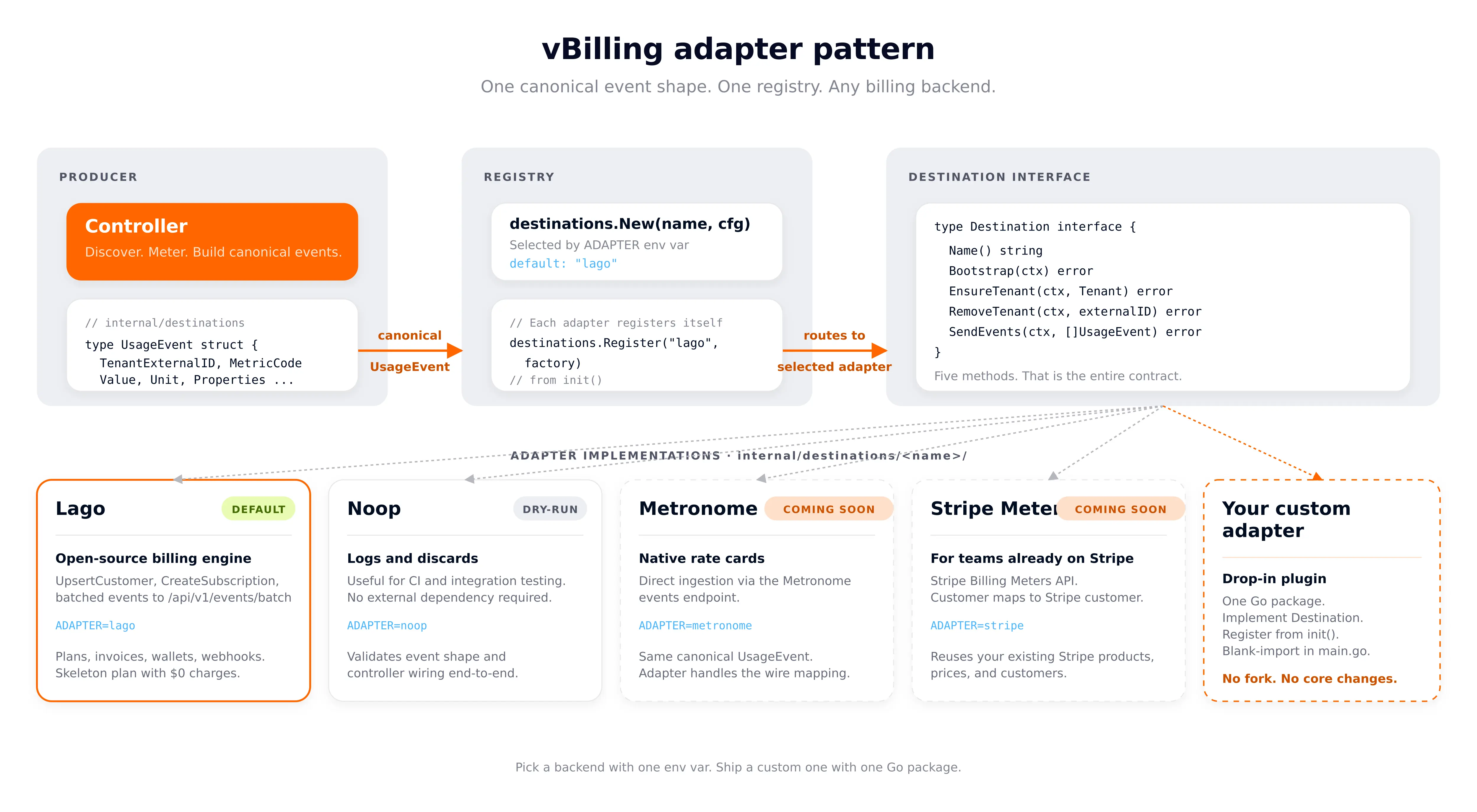
Picking a backend is one env var:
ADAPTER=lago     # default — ships today
ADAPTER=noop     # dry-run / testing — logs events, talks to nothing
Helm exposes the same selector and conditionally wires backend-specific env vars:
helm install vbilling deploy/helm/vbilling \
  --set adapter=lago \
  --set lago.apiURL=http://lago-api:3000 \
  --set lago.apiKey=$LAGO_KEY
Each adapter package self-registers from init():
// internal/destinations/lago/adapter.go
func init() {
    destinations.Register("lago", func(cfg *config.Config) (destinations.Destination, error) {
        return &Adapter{client: NewClient(cfg.LagoAPIURL, cfg.LagoAPIKey), cfg: cfg}, nil
    })
}
cmd/vbilling/main.go blank-imports the adapters it ships with so those init() functions run:
import (
    _ "github.com/vclusterlabs-experiments/vbilling/internal/destinations/lago"
    _ "github.com/vclusterlabs-experiments/vbilling/internal/destinations/noop"
)
Adding Metronome, Stripe Meters, OpenMeter, or a custom in-house backend is the same recipe: drop a package under internal/destinations/<name>/, register a factory, blank-import it, rebuild. No fork. No core changes.
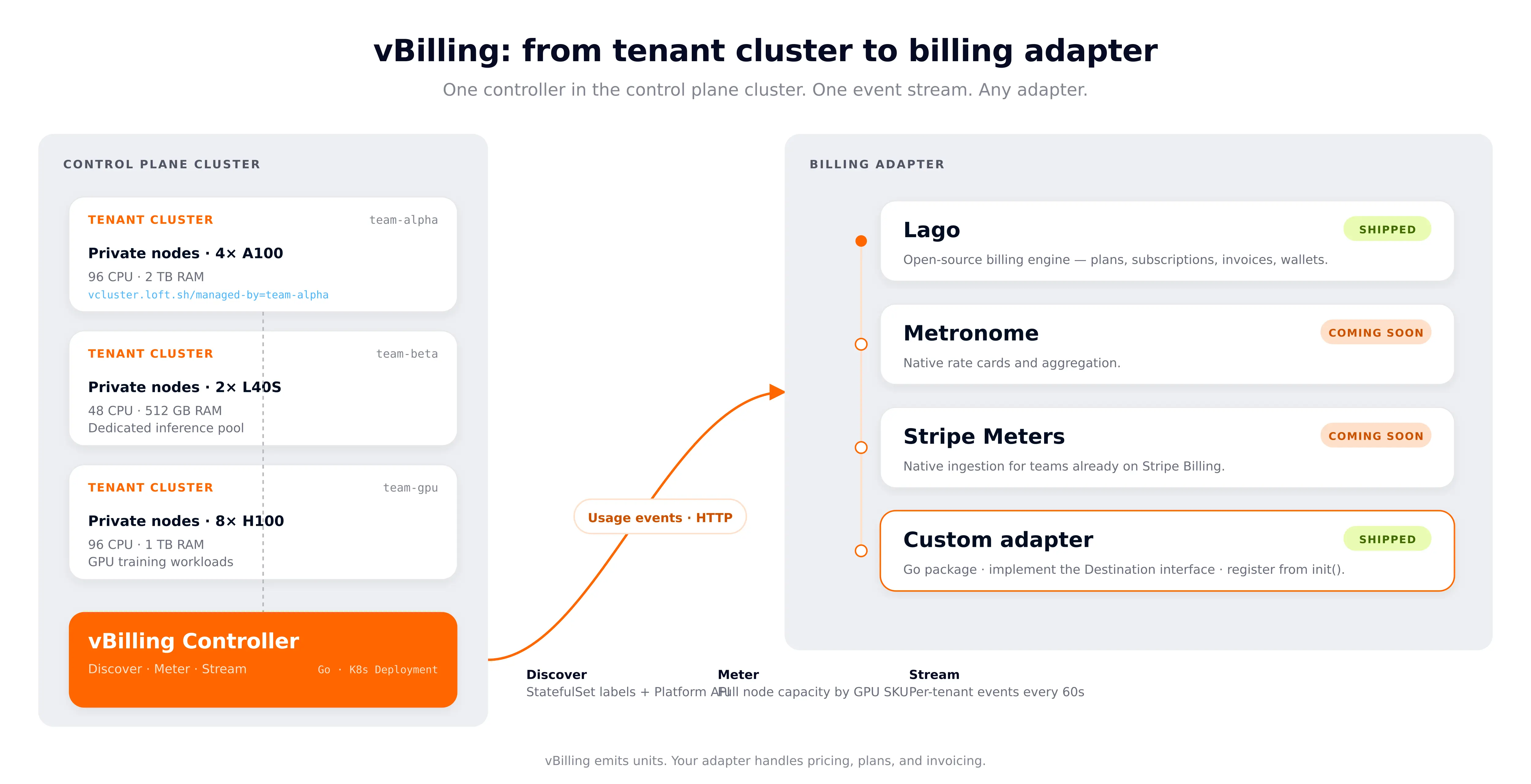
vBilling is a Go controller that runs in your Control Plane Cluster. It runs three loops continuously:
The design principle: vBilling emits units. Your adapter does the pricing. Providers configure rates in the adapter's UI or API. An H100 GPU-hour and a T4 GPU-hour are emitted as separate events so they can be priced independently.
AI Clouds hand each customer a Tenant Cluster with private, dedicated bare-metal nodes. The control plane runs centrally, workloads run on nodes allocated exclusively to that tenant. Because the whole node belongs to the tenant, vBilling meters full node capacity, not pod-level usage.
team-gpu's dedicated nodes
├── node-1: 8x H100, 96 CPU, 1TB RAM  →  full-node metering
├── node-2: 8x H100, 96 CPU, 1TB RAM  →  full-node metering
└── node-3: 8x H100, 96 CPU, 1TB RAM  →  full-node metering
Detection is one label check. When a cluster node carries vcluster.loft.sh/managed-by=<tenant>, vBilling reads its status.capacity for CPU, memory, and GPU count, plus the GPU SKU from one of the vendor labels below.
vBilling tracks nine billable metrics out of the box.
GPU hours vs GPU utilization. These are two different metrics. GPU hours is an allocation metric: vBilling reads node.status.capacity to count reserved GPUs and multiplies by time. You pay for having the GPU, whether it is busy or not. That is how every cloud provider bills. GPU utilization is a separate consumption metric sourced from DCGM: actual compute percent. Providers can use both. GPU hours for base billing, utilization for efficiency reporting or overage surcharges.
GPU billing is SKU-aware. vBilling checks four node-label conventions:
Each SKU is emitted as a separate event. Providers can then price H100 at $4.50/hr, A100 at $2.80/hr, L40S at $1.80/hr, and T4 at $0.75/hr in their adapter.
For cost attribution, vBilling checks lifecycle labels and applies a configurable discount factor (default 60%) to CPU and memory costs on spot nodes.
On startup, vBilling ensures nine billable metrics and a skeleton plan exist in your adapter with $0 pricing for all charges. You fill in rates in the adapter's UI:
Lago UI  →  Plans  →  vCluster Standard  →  Edit Charges
  CPU Core-Hours:     $0.065/unit  (your cost + margin)
  GPU Hours:          $4.50/unit   (H100 rate)
  Memory GB-Hours:    $0.009/unit
  Storage GB-Hours:   $0.0002/unit
  Network Egress GB:  $0.09/unit
  Node Hours:         $25.00/unit
Every 30 seconds, vBilling scans for Tenant Clusters using two methods:
For each new Tenant Cluster, it automatically creates a customer and subscription in your adapter. When a Tenant Cluster is deleted, the subscription is terminated.
Every 60 seconds, for each Tenant Cluster:
// Dedicated-node capacity
nodes := kubeClient.Nodes().List(label: "vcluster.loft.sh/managed-by=<name>")
// Read node.Status.Capacity for CPU, memory, GPU count
// Read GPU SKU from vendor labels

// Storage
pvcs := kubeClient.PersistentVolumeClaims(namespace).List()
// Sum requested storage for bound PVCs

// Optional: Prometheus queries for DCGM and network
// DCGM_FI_DEV_GPU_UTIL{namespace="<ns>"}
// container_network_transmit_bytes_total{namespace="<ns>"}
Raw metrics become billing units based on the collection interval.
CPU:      0.05 cores x (60s / 3600s) = 0.000833 core-hours
Memory:   0.35 GB x (60s / 3600s)    = 0.005833 GB-hours
GPU:      8 H100s x (60s / 3600s)    = 0.133333 GPU-hours
Instance: 1 x (60s / 3600s)          = 0.016667 hours
The controller emits canonical UsageEvent values; the chosen adapter serializes them. For Lago, that means batching into /api/v1/events/batch (capped at 100 events per call):
{
  "events": [
    {
      "transaction_id": "abc123-gpu-NVIDIA-H100-1712534400",
      "external_subscription_id": "sub-vcluster-team-gpu",
      "code": "vcluster_gpu_hours",
      "timestamp": 1712534400,
      "properties": {
        "gpu_hours": 0.133333,
        "gpu_count": 8,
        "gpu_type": "NVIDIA-H100-80GB-HBM3",
        "billing_mode": "private_node",
        "vcluster_name": "team-gpu"
      }
    }
  ]
}
Each event carries a unique transaction_id, so retries are idempotent — Lago dedupes on the ID. Future adapters (Metronome, Stripe Meters, OpenMeter) translate the same canonical event into their own wire shape.
Your billing adapter sums events per metric per billing period (monthly by default). At period close, it generates invoices. With Lago, you get postpay invoicing, prepay wallets, webhook delivery to Stripe, graduated pricing for volume discounts, and a built-in customer portal, all out of the box.
You can exercise the whole pipeline on your laptop with vind, vCluster in Docker. No cloud cluster required.
vcluster use driver docker
vcluster create vbilling-host --connect=true
kubectl apply -f https://github.com/kubernetes-sigs/metrics-server/releases/latest/download/components.yaml
kubectl patch deployment metrics-server -n kube-system \
  --type='json' \
  -p='[{"op":"add","path":"/spec/template/spec/containers/0/args/-","value":"--kubelet-insecure-tls"}]'
vcluster use driver helm

vcluster create team-alpha --namespace vcluster-team-alpha --connect=false
vcluster create team-beta  --namespace vcluster-team-beta  --connect=false
vcluster create team-gpu   --namespace vcluster-team-gpu   --connect=false
cd deploy/lago

openssl genrsa 2048 > lago_rsa.key
openssl rsa -in lago_rsa.key -out lago_rsa.key -traditional 2>/dev/null
echo "LAGO_RSA_PRIVATE_KEY=$(base64 -i lago_rsa.key | tr -d '\n')" > .env

docker compose --env-file .env up -d
Wait for the Lago API to come up, then create an organization:
curl -s -X POST http://localhost:3000/graphql \
  -H "Content-Type: application/json" \
  -d '{"query":"mutation { registerUser(input: { email: \"admin@vbilling.demo\", password: \"demo123!\", organizationName: \"vBilling Demo\" }) { token } }"}'

docker exec lago-db-1 psql -U lago -d lago -t -c "SELECT value FROM api_keys LIMIT 1;"
make build
LAGO_API_KEY=<key> LAGO_API_URL=http://localhost:3000 ./bin/vbilling
Expected output:
vBilling - vCluster Billing Controller
=======================================
Adapter: lago
Plan: vcluster-standard | Currency: USD
Collection: 1m0s | Reconcile: 30s
[bootstrap] setting up Lago billing configuration...
[bootstrap] created metric "vcluster_cpu_core_hours" (id=...)
[bootstrap] created metric "vcluster_gpu_hours" (id=...)
... (9 metrics total)
[bootstrap] created plan "vcluster-standard" with 9 charges (all $0)
[controller] starting (adapter=lago, reconcile=30s, collection=1m0s)
[discovery] found 1 vCluster(s)
[controller] new Tenant Cluster discovered: vcluster-team-gpu/team-gpu
[lago] POST /api/v1/customers -> 200
[lago] POST /api/v1/subscriptions -> 200
[metrics] vcluster-team-gpu: CPU=0.075 cores, Memory=0.30 GB
[lago] POST /api/v1/events/batch -> 200
[controller] sent 8 billing events to lago
Open Lago at http://localhost:8080. Go to Customers, pick one, and open Overview — the gross revenue and any open subscriptions are right there. For a per-metric breakdown of the current period, finalize the current period by terminating the subscription (or wait for the natural cycle close), then open the resulting invoice from the Invoices tab — it has one line item per metric (CPU Core-Hours, GPU Hours, etc.) with units and amounts.
Note: Lago's open-source edition gates the live per-subscription "Usage" UI behind a paid plan, but the same data is always available via the API at /api/v1/customers/<id>/current_usage and is fully exposed on any finalized invoice.
vcluster use driver docker
vcluster delete vbilling-host
cd deploy/lago && docker compose down -v
Here is how vBilling fits a typical GPU AI Cloud architecture:
Operator setup:
How vBilling bills this:
Pricing control. The AI Cloud sets all pricing in the adapter. They can create multiple plans:
Deploy your adapter and vBilling in the Control Plane Cluster (or a dedicated management cluster).
Control Plane Cluster
├── Namespace: lago-system
│   ├── postgres (StatefulSet)
│   ├── redis (Deployment)
│   ├── lago-api (Deployment, port 3000)
│   ├── lago-worker (Deployment, Sidekiq)
│   ├── lago-clock (Deployment)
│   └── lago-front (Deployment, port 80)
│
├── Namespace: vbilling-system
│   └── vbilling (Deployment)
│       ServiceAccount + ClusterRole for read access to:
│       pods, nodes, metrics, PVCs, services, statefulsets
│
├── Namespace: vcluster-team-alpha
│   └── team-alpha-0 (virtual control plane)
├── Namespace: vcluster-team-gpu
│   └── team-gpu-0 (virtual control plane)
└── Dedicated GPU nodes (allocated to team-gpu)
Install with Helm:
helm upgrade --install vbilling deploy/helm/vbilling \
  --namespace vbilling-system --create-namespace \
  --set adapter=lago \
  --set lago.apiURL=http://lago-api.lago-system:3000 \
  --set lago.apiKey=<key>
Your adapter runs on a VM (simpler to manage). vBilling runs in the cluster and connects over an external URL.
# On the VM
cd deploy/lago
docker compose --env-file .env up -d

# In the cluster
helm install vbilling deploy/helm/vbilling \
  --set adapter=lago \
  --set lago.apiURL=http://<vm-ip>:3000 \
  --set lago.apiKey=<key>
Everything on your laptop. vBilling connects to the cluster via kubeconfig. This is what we used for the vind walkthrough.
LAGO_API_KEY=<key> LAGO_API_URL=http://localhost:3000 ./bin/vbilling
We validated vBilling on GKE with an actual NVIDIA T4 to verify dedicated-node billing end-to-end on real infrastructure.
gcloud container clusters create vbilling-test \
  --zone=us-central1-a --num-nodes=2 --machine-type=e2-standard-2

gcloud container node-pools create gpu-pool \
  --cluster=vbilling-test --zone=us-central1-a \
  --num-nodes=1 --machine-type=n1-standard-4 \
  --accelerator=type=nvidia-tesla-t4,count=1
Result: three nodes, two e2-standard-2 defaults plus one n1-standard-4 with a T4 attached.
Created a Tenant Cluster and labeled the GPU node as its dedicated node:
vcluster create team-gpu --namespace vcluster-team-gpu --connect=false
kubectl label node gke-vbilling-blog-gpu-pool-6b39ab0e-4jkx \
  vcluster.loft.sh/managed-by=team-gpu
vBilling output, GPU detected and billed:
[metrics] vcluster-team-gpu: CPU=0.075 cores, Memory=0.30 GB
[metrics] vcluster-team-gpu: Storage=5.00 GB (1 PVCs)
[metrics] vcluster-team-gpu: found 1 private node(s): totalCPU=4 cores, totalMemory=14.64 GB, totalGPUs=1
[metrics]   node=gke-vbilling-blog-gpu-pool-6b39ab0e-4jkx type=n1-standard-4 cpu=4 mem=14988Mi gpus=1(nvidia-tesla-t4) on-demand
[metrics] vcluster-team-gpu: added private node usage: CPU=+1.924 cores, Memory=+2.65 GB
[lago] POST /api/v1/events/batch -> 200
[lago] sent 8 billing events
[controller] sent 8 billing events to lago
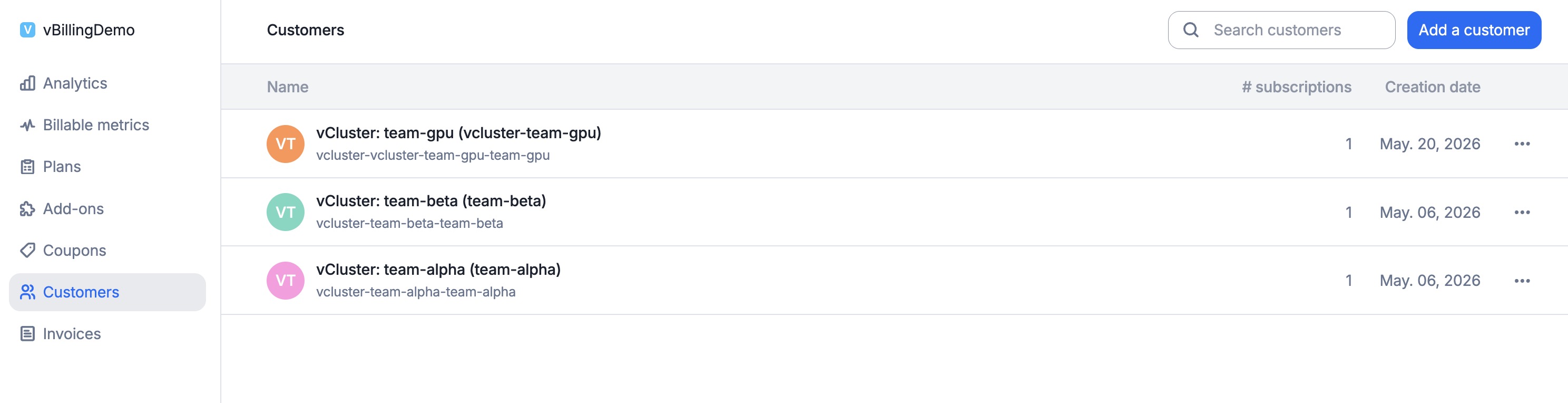
Customers auto-discovered. vBilling created a Lago customer for every Tenant Cluster it found — each with vcluster_name and vcluster_namespace metadata pinning the customer back to its source Tenant Cluster:
Per-metric usage breakdown. Drill into the team-gpu subscription and Lago shows the live current period broken out by metric. Per-unit rates: CPU $0.05/core-hr, memory $0.01/GB-hr, GPU $2.50/hr, instance $0.10/hr, private node $0.40/hr. The GPU Hours line is the T4 dedicated node billed against team-gpu.
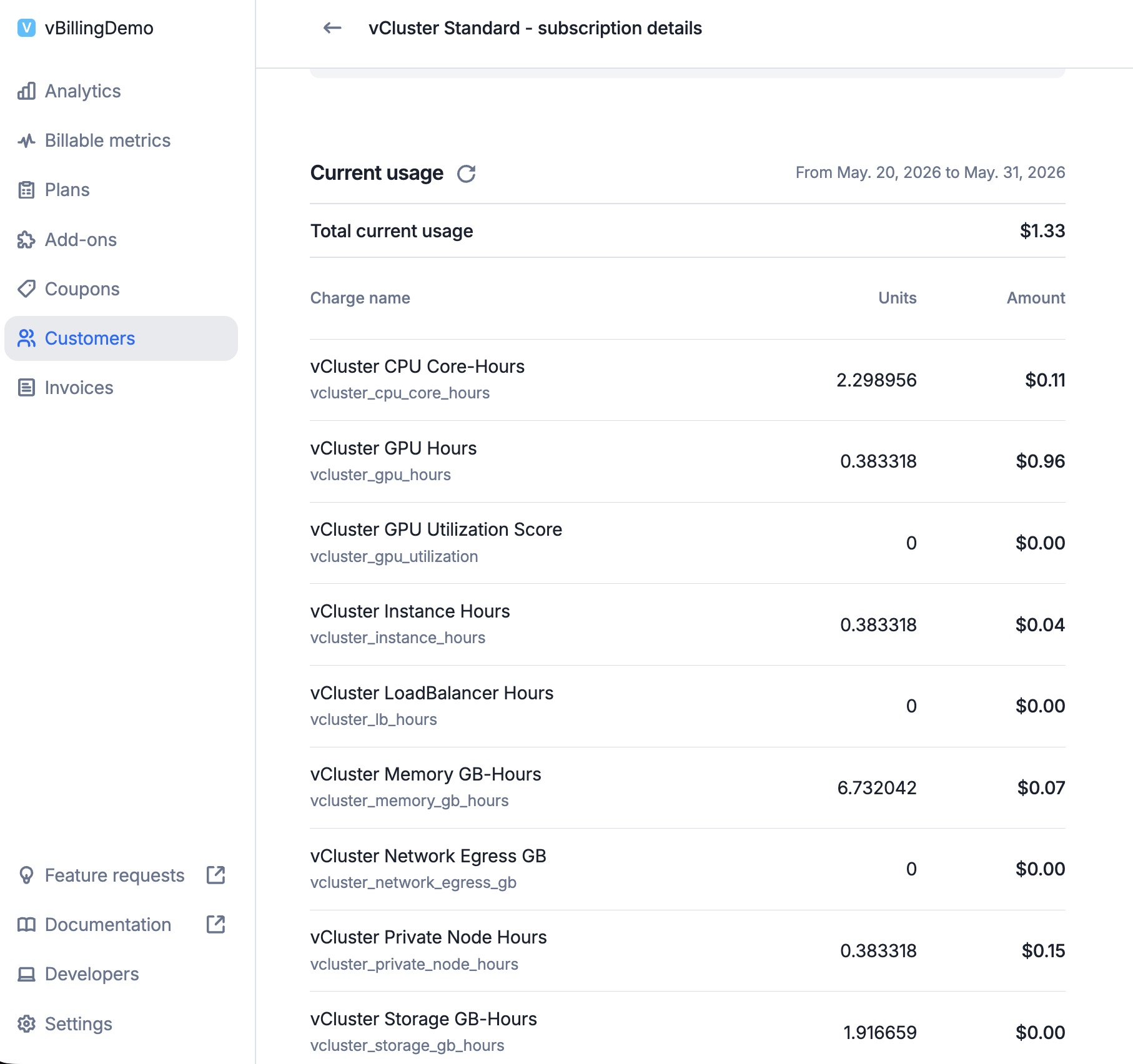
The GPU hours line confirms vBilling correctly detected the nvidia-tesla-t4 GPU on the dedicated node and billed for it. Notice the 23 events for each "per-node" metric: one collection cycle per minute, capturing the full T4 node allocation against the team-gpu tenant.
gcloud container clusters delete vbilling-test --zone=us-central1-a --quiet
Beyond running locally, we deployed vBilling as an actual Kubernetes Deployment inside a vind cluster to validate the full production path: Docker image, Helm chart, ServiceAccount, ClusterRole RBAC, and in-cluster config.
# Build and load the image into vind's containerd
docker build --build-arg TARGETARCH=arm64 -t vbilling:test .
docker save vbilling:test | docker exec -i vcluster.cp.vbilling-host \
  ctr -n k8s.io images import --all-platforms -

# Create secret and deploy via Helm
kubectl create namespace vbilling-system
kubectl create secret generic lago-credentials \
  --namespace vbilling-system \
  --from-literal=api-key="$LAGO_API_KEY"

helm upgrade --install vbilling deploy/helm/vbilling \
  --namespace vbilling-system \
  --set image.repository=vbilling \
  --set image.tag=test \
  --set image.pullPolicy=Never \
  --set adapter=lago \
  --set lago.apiURL=http://host.docker.internal:3000 \
  --set lago.existingSecret=lago-credentials
Pod logs show it works end-to-end:
Using in-cluster Kubernetes config
[bootstrap] metric "vcluster_cpu_core_hours" already exists
[bootstrap] metric "vcluster_gpu_hours" already exists
[discovery] Platform API not available, falling back to StatefulSet scanning
[discovery] found 3 Tenant Cluster(s)
[controller] new Tenant Cluster discovered: vcluster-team-alpha/team-alpha
[controller] ensured customer vcluster-vcluster-team-alpha-team-alpha
[controller] subscription sub-vcluster-vcluster-team-alpha-team-alpha already exists, reusing
[metrics] vcluster-team-alpha: CPU=0.048 cores, Memory=0.33 GB
[metrics] vcluster-team-beta:  CPU=0.049 cores, Memory=0.35 GB
[metrics] vcluster-team-gpu:   CPU=0.046 cores, Memory=0.34 GB
[controller] streamed 12 billing events
This validates:
git clone https://github.com/vClusterLabs-Experiments/vbilling.git
cd vbilling
make build

# Run the full demo
chmod +x scripts/demo.sh
./scripts/demo.sh
vBilling is open source under Apache 2.0. Contributions welcome.
vBilling is the pipe. Your adapter handles the pricing, plans, and invoicing. You handle your margin. Read the landing page for the full story.
Deploy your first virtual cluster today.
