Kubernetes Multi-Tenancy: Why Virtual Clusters Are The Best Solution

Jul 19, 2021
|
min Read

Editor's Note (August 2026): Since publication, the vCluster project has evolved significantly. For large enterprises and AI cloud providers who require hard tenant isolation for their AI infrastructure, vCluster platform now also offers Private Nodes as the production default. For the current platform capabilities, see our solutions page.
As your organization grows and Kubernetes becomes more integrated into your daily workflow, more complex needs will arise. You probably started with a single cluster for everything, but now you see a need for multiple clusters. Perhaps you need a separate one for testing, one for specific workloads, or something else entirely.
Many in your situation have resorted to multi-tenancy in Kubernetes, the practice of having multiple non-connected tenants use a common base of resources. In this article, you'll learn what the more traditional solutions are and get insight into one of the new recommended solutions: virtual clusters.
Multi-tenancy, in general, is not a new thing. In the server world, it's been widely used in data centers. Kubernetes is rapidly growing, and some providers are using Kubernetes as the backbone of their hosting solutions. So multi-tenancy has become a big topic here, too. Over the years, various methods of Kubernetes multi-tenancy have popped up, with namespace isolation being the most used solution.
Namespace isolation is the practice of dedicating a single namespace per tenant. This practice can be split up into two separate implementations:
With hard multi-tenancy, you will have to implement networking rules to ensure namespaces don't talk to each other. You will have to make sure that permissions are configured correctly and strictly. In short, you will have to make sure everything inside your cluster is namespaced. This comes with some challenges.
With hard multi-tenancy, it can be tough to implement security properly. If you don't implement all the permissions correctly, you risk a malicious tenant affecting the others.
Tenants affecting each other may not only be a result of poorly implemented security practices. You have to make sure that resource limitations are put in place correctly. One tenant with a lot of load could cause other tenants to go down. Luckily, these are things that can be addressed by implementing multi-tenancy correctly.
However, some limitations of hard multi-tenancy are nearly impossible to work around. One such issue is with Custom Resource Definitions (CRDs).
CRDs are very popular with Kubernetes users, but they're difficult to implement with hard multi-tenancy, as CRDs are cluster-wide. The objects created using CRDs are possible to namespace, but not the CRDs themselves. For example, you may have multiple tenants wanting to use cert-manager, but they want to use different versions. Because the CRD itself is cluster-wide, this is not possible. That's aside from the fact that with proper multi-tenancy, the tenant won't even be able to install the CRD themselves.
Another big issue with hard multi-tenancy is permissions. Not the kind of permissions we've already talked about, but the ones your tenants want to implement. Most Kubernetes clusters use RBAC as a way of controlling permissions. But because you sometimes need to be an admin of the entire cluster to configure these, tenants will run into trouble with something like installing Helm charts.
As you can see, hard multi-tenancy is not just tough to implement correctly, but once you've got it set up exactly the way you're supposed to, you can be severely limited in your functionality. Because of this, many have sought to find a new solution, one with the benefits of multi-tenancy, without compromising the usual feature set you get with single-tenant clusters.
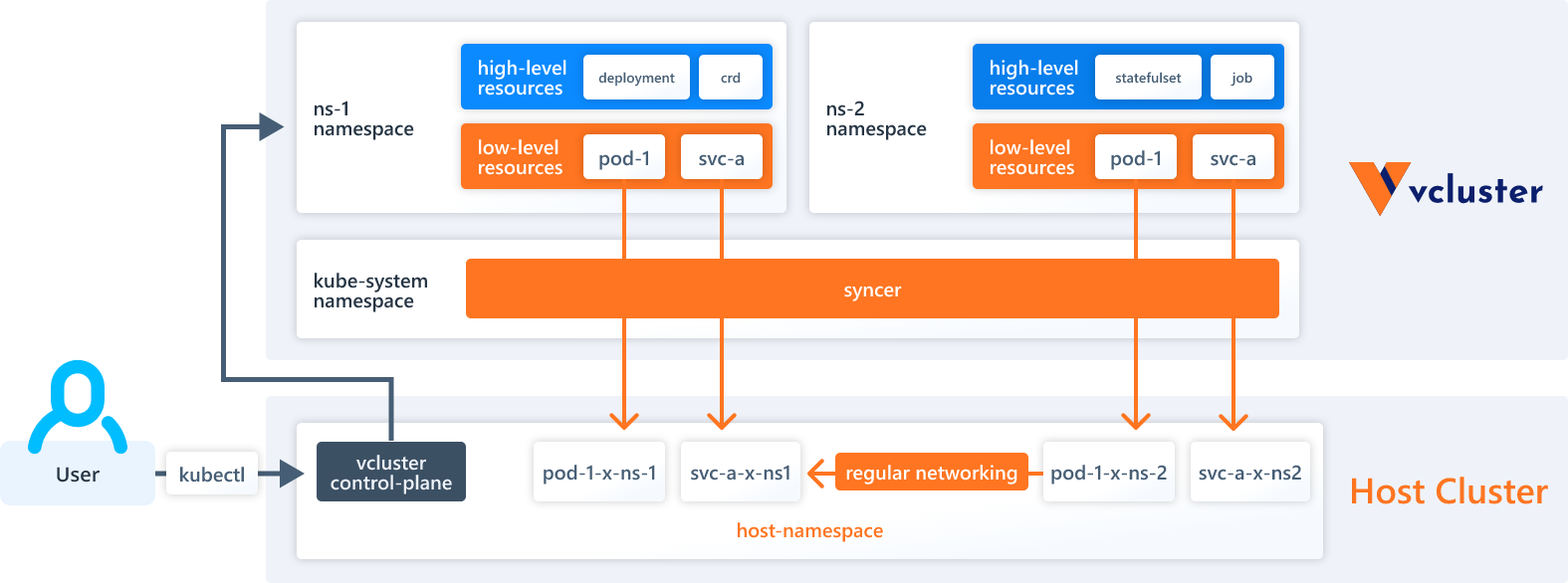
Virtual clusters provide you with many of the benefits you would otherwise get from a multi-tenancy solution and all the benefits you get from a single-tenancy solution. As can be deduced from the name, this solution allows you to have entirely virtual clusters in the same way that you normally have virtual machines. You have a single Kubernetes cluster, inside of which you can have many other clusters.
A virtual cluster can have its own API server, its own controller manager, and its own etcd or other storage backend. Resources themselves will run on the underlying host, and you will be able to view a pod created in a virtual cluster by running kubectl get pods --all-namespaces on the host.
This is because virtual clusters are themselves namespaced. You create a namespace, and in there you deploy your virtual cluster. All resources created in the virtual cluster will then run in this single namespace on the host.
This doesn't mean that you are restricted to only one namespace inside your virtual cluster, though. As stated before, every virtual cluster has its own API server. Everything logical is handled purely inside the virtual cluster, meaning you can create as many namespaces as you want, you can deploy CRDs, and you can configure RBAC however you like.
For all intents and purposes, to the user, a virtual cluster is a full-blown cluster. You need a special tool to get access in the first place, but once you've configured kubectl to use the virtual cluster, it's exactly like working with a standard cluster. You can even create virtual clusters inside virtual clusters, giving you the opportunity for as much abstraction as you want.
Virtual clusters are just a concept on the surface, and there are potentially many ways to implement them. The team at Loft Labs has designed an open source command-line tool called vcluster. You can use vcluster to create a namespace in your host cluster, and then a virtual cluster in that namespace. From here, you use the vcluster tool to get access, and now you are working in a virtual cluster. Under the hood, vcluster uses k3s to manage the virtual clusters, ensuring that it's fast and reliable. Multi-tenancy is usually troublesome to set up, but vcluster makes setting up a virtual cluster as easy as possible.
Updated (2026): For AI cloud providers and enterprises requiring a stronger isolation model, vCluster platform now offers Private Nodes as the production default, providing dedicated worker nodes per tenant with isolated networking and storage suitable for running AI infrastructure at scale.
Now you know more about the traditional ways to set up multi-tenancy and why virtual clusters can be a better approach. You know about the thoughts that go into choosing soft vs. hard multi-tenancy, the challenges that come with hard multi-tenancy, and the issues that are solved using virtual clusters instead.
Go to vcluster.com to learn more. The open-source vCluster is available on GitHub and can be installed in minutes, ideal for platform teams who want to add tenant clusters to an existing Kubernetes setup. If you're an AI cloud provider looking to launch a managed Kubernetes service on your GPU infrastructure, check out our solutions page. It gives you the full stack: Private Nodes for hardware-level tenant isolation, fleet management, self-service portals, and everything you need to give your customers the hyperscaler experience in days, not months.
Photo by Sergio Souza
Deploy your first virtual cluster today.
