Guide
Tenancy Models with vCluster
The Ultimate Guide to Kubernetes Isolation
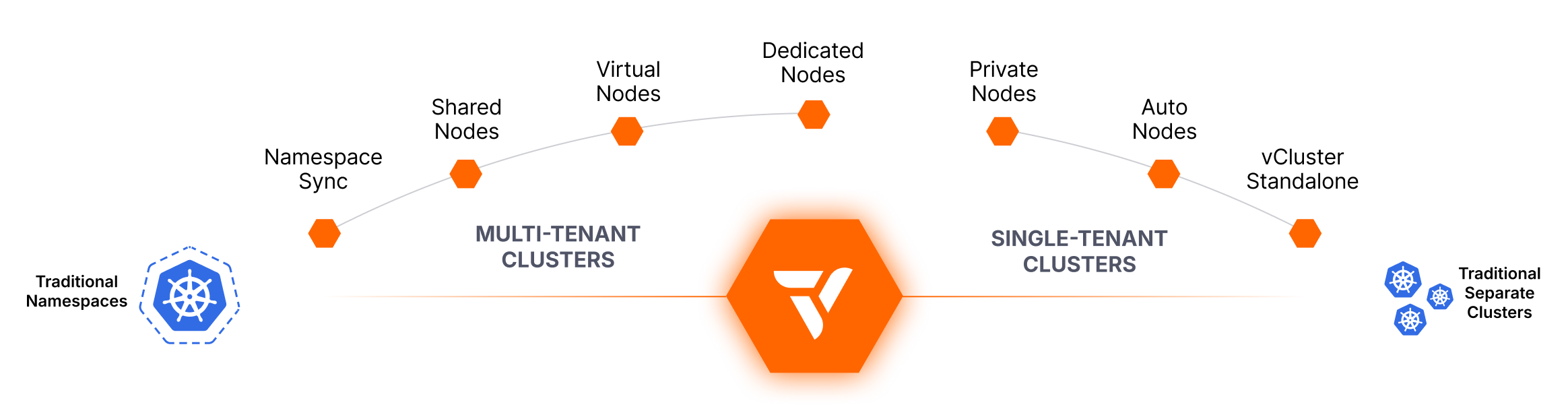
Kubernetes does not make multi-tenancy easy. Platform teams need to support fast-moving engineering orgs while controlling cost, keeping workloads secure, and staying operable. SaaS vendors, service providers, and regulated enterprises face the same problem with a harder boundary, because their tenants are not colleagues.
vCluster gives every tenant a dedicated control plane, its own API server, its own CRDs, and its own RBAC. What changes from model to model is where the tenant’s workloads run, and that one choice, the worker node model, is what sets the actual isolation level.
This guide covers every tenancy model vCluster supports, from lightweight namespace-based approaches through fully isolated per-tenant infrastructure, plus platform capabilities like Auto Nodes that keep infrastructure efficient. It orders the models from weakest boundary to strongest, says plainly which ones are safe for untrusted tenants, and starts with the questions that narrow the field.
Nine models sounds like a lot of choices. It is really one, and three questions narrow it. Ask them about the environment you hand to a tenant, whether that tenant is another team in your company or a paying customer.
If your tenants are trusted, the lighter models are open to you. Trusted means every workload owner is inside your organization, you accept that tenants share a kernel, no contract requires dedicated infrastructure, and you can enforce hardening before onboarding. Most internal developer platforms sit here, and shared nodes are the efficient answer.
If your tenants are not trusted and any of the three answers is yes, you need private nodes. Every model above that line shares a kernel between tenants, and a shared kernel is not a boundary you can put an untrusted tenant behind. That applies to external customers, resold capacity, and regulated workloads, and it applies just as much to an internal tenant your compliance team treats as separate.
That is the core decision. The rest of this guide is about picking the most efficient model on the correct side of it.
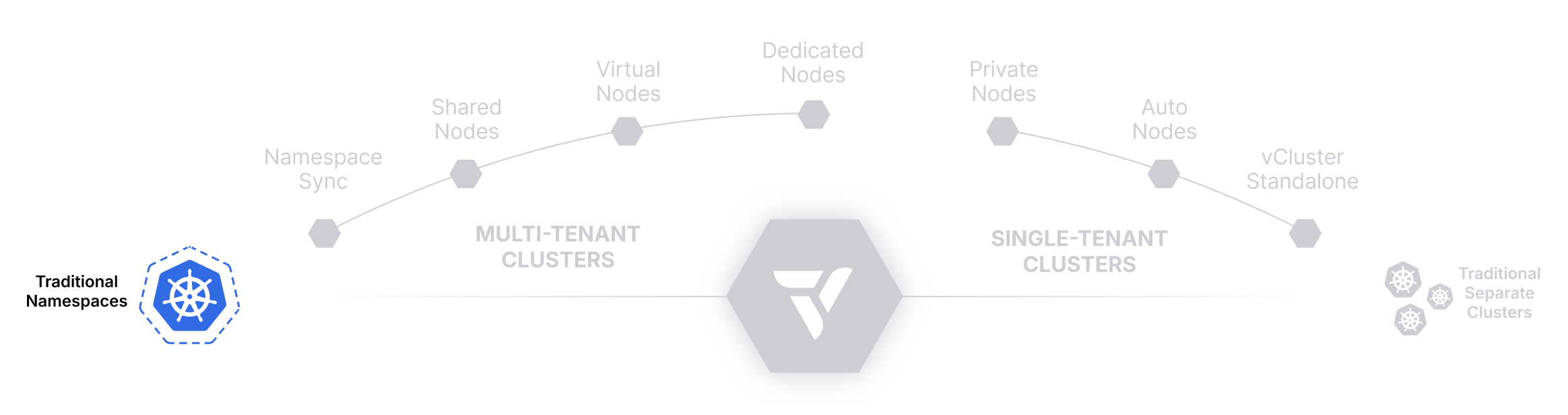
Use Native Namespaces for Multi-Tenancy: Fast, but Limited in Scope
This is the baseline vCluster improves on, rather than a vCluster model. Lightweight and simple, but lacks strong isolation. Ideal for small teams or environments where security boundaries aren’t a concern.
Kubernetes namespaces are the most basic and widely used model for multi-tenancy. Each team or tenant is assigned a unique namespace within a shared cluster. Platform teams can apply RBAC rules, network policies, and resource quotas to help segment access and limit usage within each namespace.
While this approach is quick to set up and uses only core Kubernetes primitives, it lacks any form of control plane or API isolation. All tenants share the same scheduler, CRDs, node pool, and cluster-wide configurations. As a result, namespaces are prone to issues like CRD conflicts, noisy neighbors, and accidental cross-tenant impacts, making them unsuitable for production-grade multi-tenancy at scale.
Namespaces logically divide a Kubernetes cluster into smaller, scoped environments using native Kubernetes objects. Each tenant receives a namespace, and optional policies are layered on top:
All tenants continue to use the same underlying control plane, scheduler, node pool, and extensions. Cluster-wide resources like CRDs and webhooks are still global, and a misconfigured tenant can easily impact others.
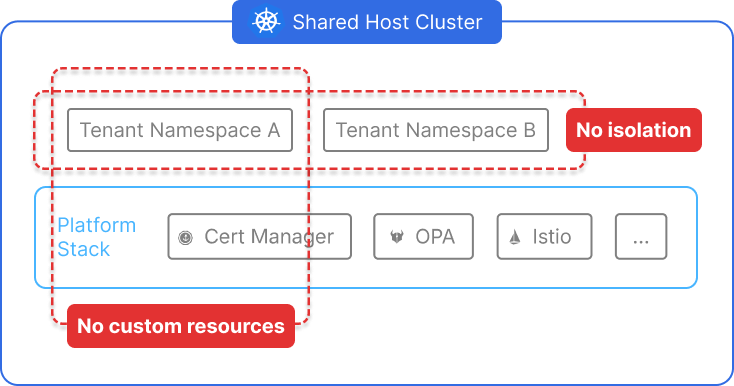
These limitations make traditional namespaces a poor fit for environments with strong isolation, customization, or scalability requirements.
| Dimension | Isolation Level |
|---|---|
| Control Plane | ❌ None |
| Network | 🔶 Limited (via network policies) |
| Node/Compute | ❌ Shared |
| RBAC/Namespace | 🔶 Scoped access, not fully isolated |
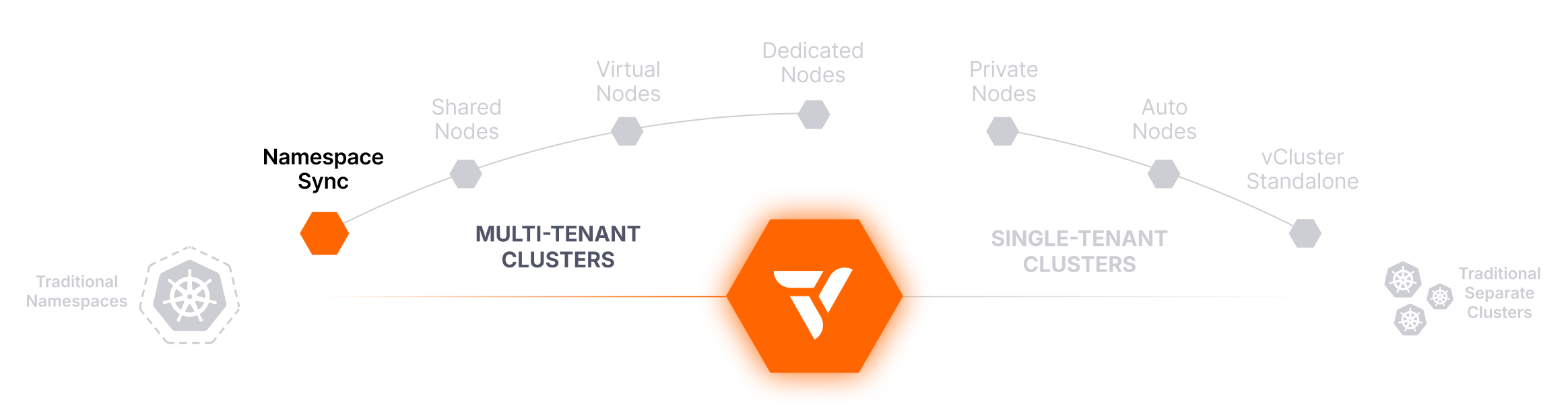
Sync Tenant Namespaces to a Tenant Cluster: Lightweight Isolation, No Infrastructure Changes
Bring existing namespaces under vCluster management without disrupting workloads or provisioning new clusters.
Namespace Syncing allows you to connect existing Kubernetes namespaces from the Control Plane Cluster to a tenant cluster, making it one of the fastest and most flexible ways to adopt vCluster without changing how workloads are deployed. This approach lets you treat an existing namespace as a fully isolated tenant cluster from an access, API, and control perspective, without relocating workloads or provisioning additional infrastructure.
With Namespace Syncing, platform teams can gradually migrate to vCluster without impacting running workloads. Tenants gain tenant cluster benefits like isolated API access, scoped RBAC, and custom CRDs, while underlying compute remains shared and existing namespace-level policies stay in place.
When a vCluster is created with namespace syncing enabled, it establishes a logical connection between a namespace in the Control Plane Cluster and the tenant cluster’s control plane. All Kubernetes resources created within the tenant cluster are automatically synced into the specified namespace on the Control Plane Cluster.
The synced namespace continues to use the Control Plane Cluster’s node pool, network infrastructure, and storage. However, tenants interact with the tenant cluster as if it were a dedicated environment, with their own CRDs, RBAC policies, service accounts, and access controls, all enforced by vCluster.
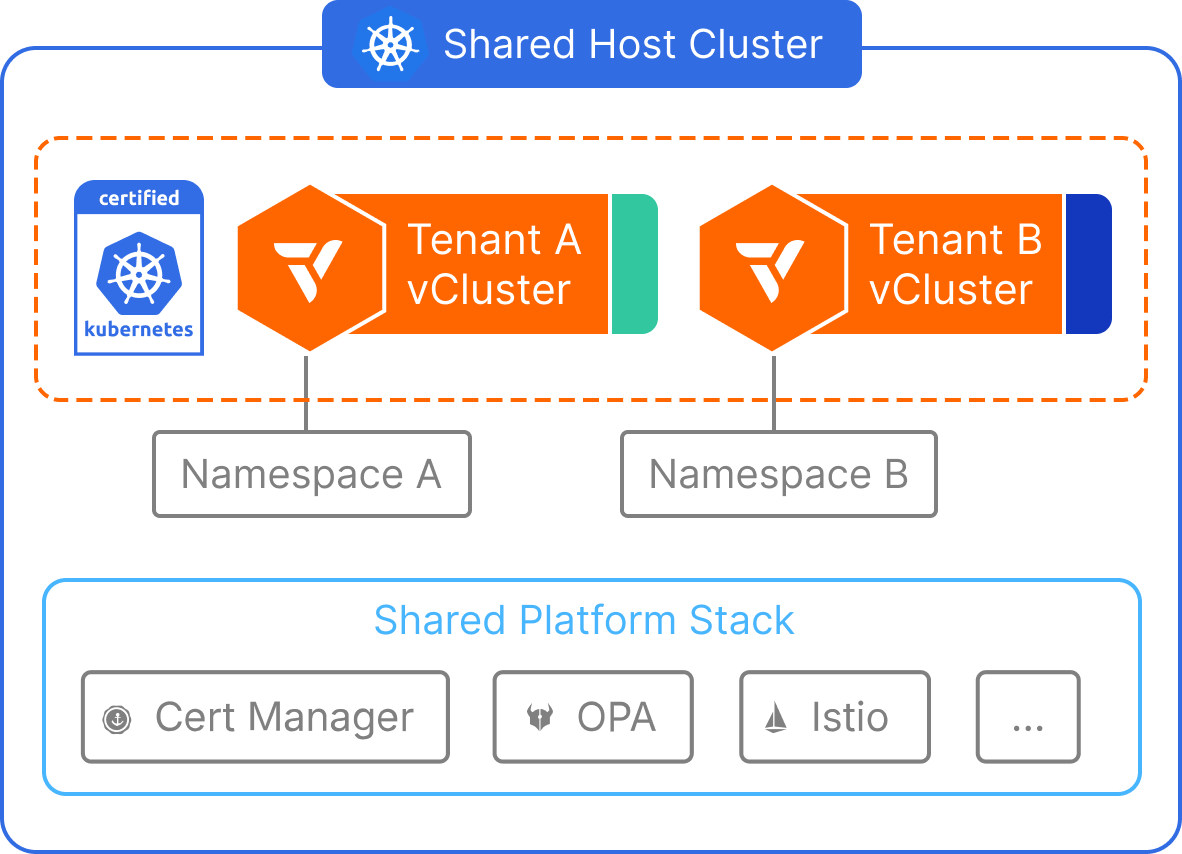
Namespace Syncing offers a strong improvement over traditional namespaces, but it still inherits some of the same infrastructure-level limitations.
| Dimension | Isolation Level |
|---|---|
| Control Plane | ✅ Isolated via vCluster |
| Network | 🔶 Shared (requires policies) |
| Node/Compute | ❌ Shared |
| RBAC/Namespace | ✅ Fully isolated via vCluster |
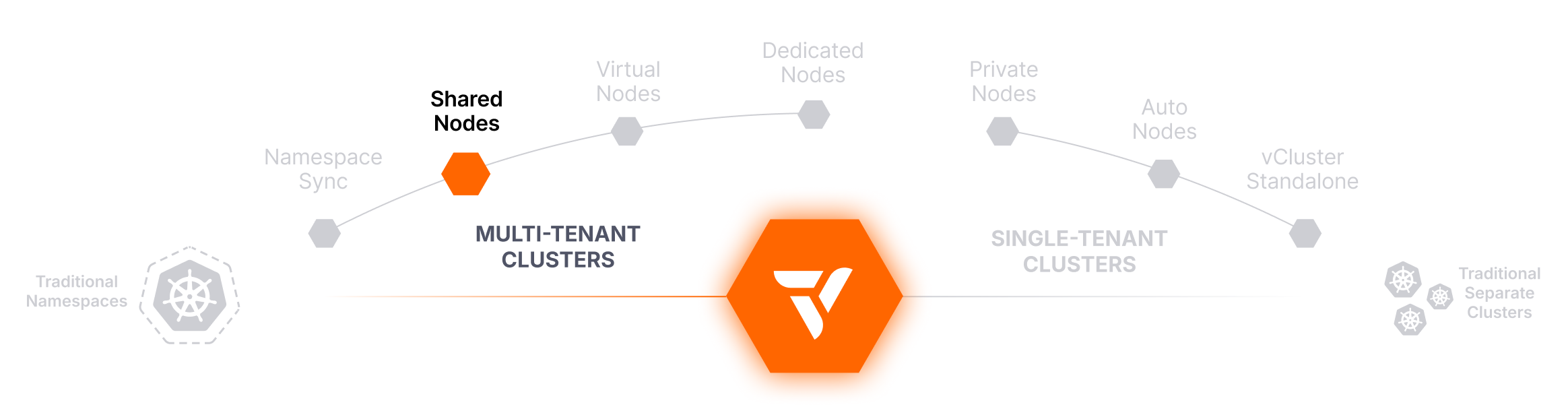
Run Tenant Clusters on Shared Nodes: Maximum Density, No New Infrastructure
Shared nodes are how you offer nested clusters. A nested cluster is a tenant cluster whose control plane and workloads both run inside a Control Plane Cluster you already operate. Every tenant gets a dedicated API server, its own CRDs, and its own RBAC at near-zero marginal cost, with no new infrastructure to provision per tenant. That makes it the right shape for internal developer platforms, dev and test environments, CI, sandboxes, evaluation environments, and any tier where the tenants are colleagues. It is a density and cost model.
Nested clusters share the node and the kernel. That makes them a cost model, not a security boundary. They are not for external, resold, regulated, or otherwise untrusted tenants who get cluster access or can run arbitrary workloads. When an environment reaches any of those, move it to private nodes. The platform, the API, and the tenant’s experience do not change.
The Shared Nodes tenancy model allows multiple tenant clusters to run workloads on the same physical Kubernetes nodes. This configuration is ideal for scenarios where maximizing resource utilization is a top priority, especially for internal developer environments, CI/CD pipelines, and cost-sensitive use cases.
Each tenant cluster has its own isolated control plane, API server, and CRDs, but workloads are scheduled without node-level isolation. This setup helps platform teams deliver the benefits of vCluster (like per-tenant customization and faster provisioning) while minimizing infrastructure costs by sharing underlying compute across all tenants.
All tenant clusters run in a single Control Plane Cluster and schedule pods onto the same shared node pool. The tenant cluster’s control plane enforces separation at the API, RBAC, and CRD levels, but does not restrict pod scheduling unless additional mechanisms (e.g., taints, affinities) are applied.
Tenants interact with their own tenant clusters as if they are separate environments, but their workloads run side-by-side with those from other tenant clusters at the node level. Shared infrastructure components like the container runtime, CNI, and CSI drivers are used across all tenants.
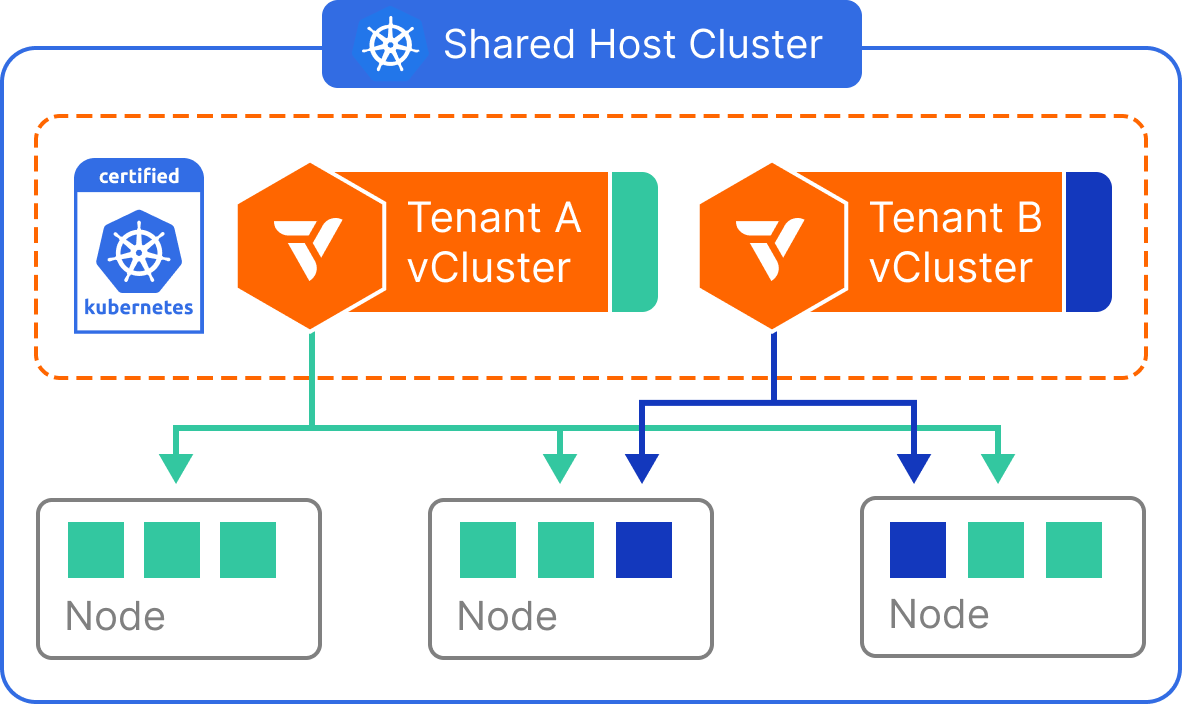
This model is best when speed and density matter more than strict isolation guarantees.
| Dimension | Isolation Level |
|---|---|
| Control Plane | ✅ Isolated via vCluster |
| Network | 🔶 Shared (requires policies) |
| Node/Compute | ❌ Shared |
| RBAC/Namespace | ✅ Fully scoped within vCluster |
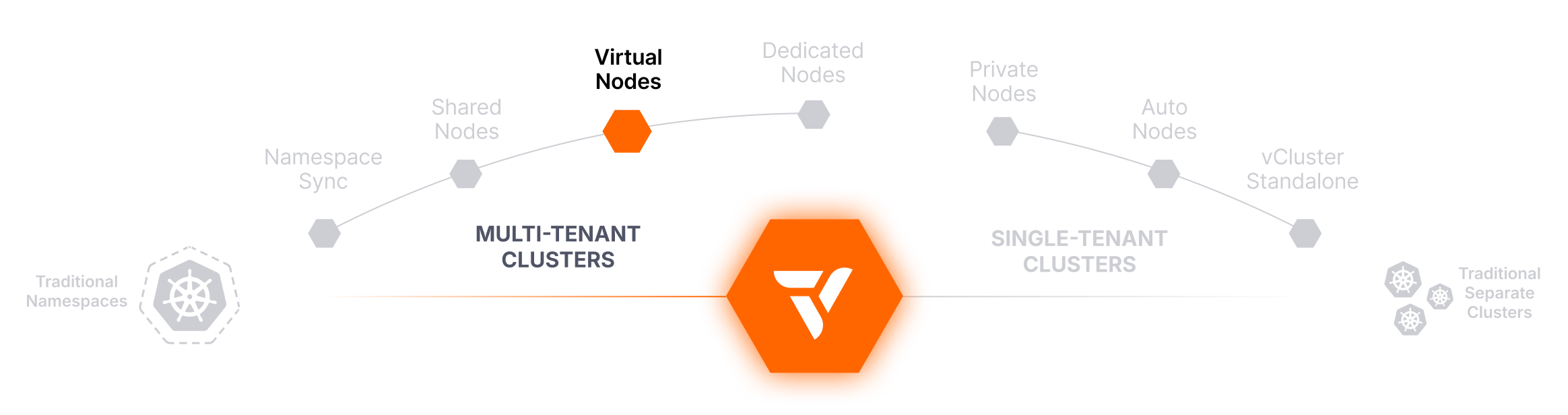
A Kernel Boundary on Shared Nodes, with No VM and No Virtual Kubelet
vNode isolates tenant workloads on shared nodes using Linux user namespaces, FUSE-based filesystem virtualization, and targeted seccomp filtering. Tenants cannot read each other’s files, processes, or hardware information, and that holds even after a container escape.
This gives you a kernel boundary between tenants without dedicating nodes to each one. A single vNode can be shared across all pods in one tenant cluster, so tenants get a virtualized view of the node environment rather than the real one, while the underlying compute stays pooled. Each tenant cluster still receives its own control plane, CRDs, and RBAC.
vNode runs as a container runtime layer on the shared node. Tenant workloads are placed inside Linux user namespaces, so a process that believes it is root inside the tenant cluster is an unprivileged user on the host. FUSE-based filesystem virtualization gives each tenant its own view of the filesystem, and seccomp filtering blocks the syscalls that would otherwise leak host or cross-tenant information.
From the tenant’s perspective they see one or more virtual nodes, each a scoped execution environment. They do not see or interact with the real underlying node, other tenants’ processes, or host hardware details. Compute is still pooled underneath, but the kernel-level view is not shared.
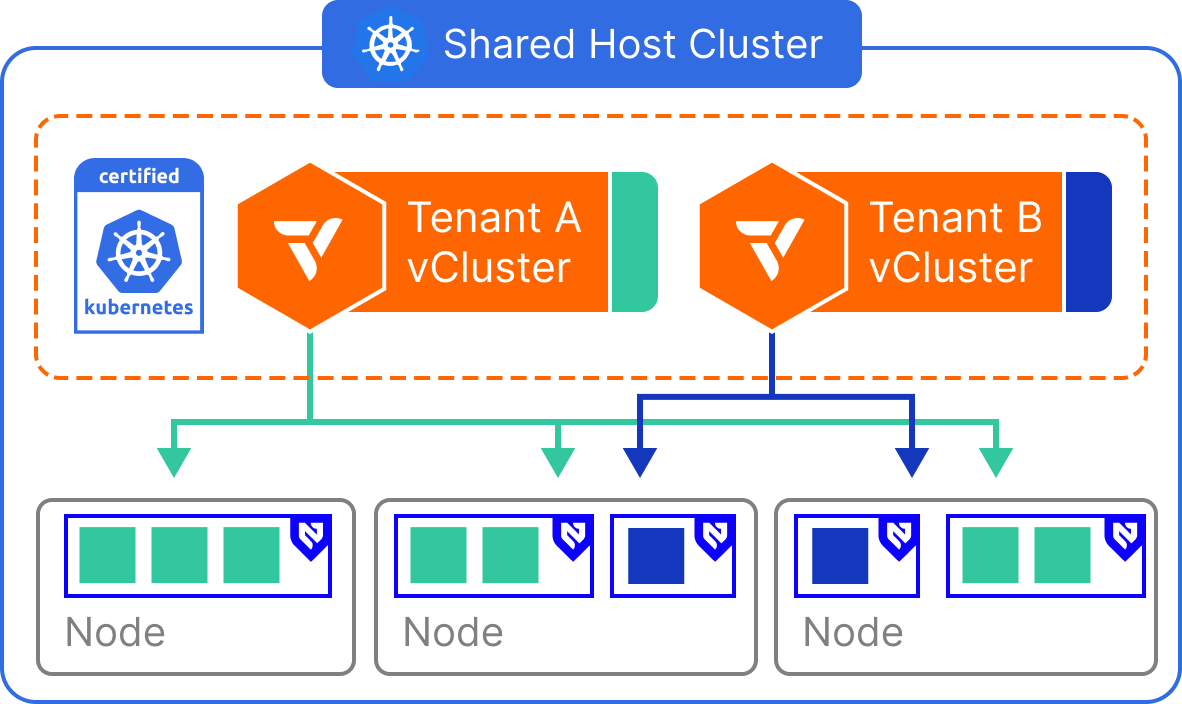
This tenancy mode is ideal when you need workload separation but want to avoid operational and cost overhead from dedicated infrastructure.
| Dimension | Isolation Level |
|---|---|
| Control Plane | ✅ Isolated via vCluster |
| Network | 🔶 Shared (requires policies) |
| Node/Compute | ✅ Virtualized node abstraction |
| RBAC/Namespace | ✅ Fully scoped within vCluster |

Assign Tenant Clusters to Specific Node Pools: Dedicated Compute, No Cluster Sprawl
Provides node-level compute separation by targeting labeled node groups within a shared cluster.
Dedicated Nodes allow platform teams to give each tenant cluster exclusive access to a set of physical nodes, without having to provision entirely separate clusters. By combining vCluster’s multi-tenant architecture with Kubernetes node selectors, workloads from each tenant cluster can be scoped to a specific group of labeled nodes, ensuring compute separation across tenants.
This approach enables strong operational boundaries and predictable performance, while maintaining all the benefits of shared infrastructure. It’s especially effective for teams who want dedicated compute for certain tenants, environments, or workloads, without duplicating every part of the platform stack.
Each tenant cluster is configured with a Kubernetes nodeSelector (or affinity rules) that ensures all tenant workloads are scheduled only to nodes with specific labels. For example, a tenant cluster assigned to nodegroup=tenant-a will only run pods on nodes matching that label.
While compute is scoped to these dedicated nodes, all other components, including the CNI, CSI, and the underlying Control Plane Cluster, remain shared. The tenant cluster itself maintains full API isolation, separate CRDs, tenant-specific RBAC, and control plane security.
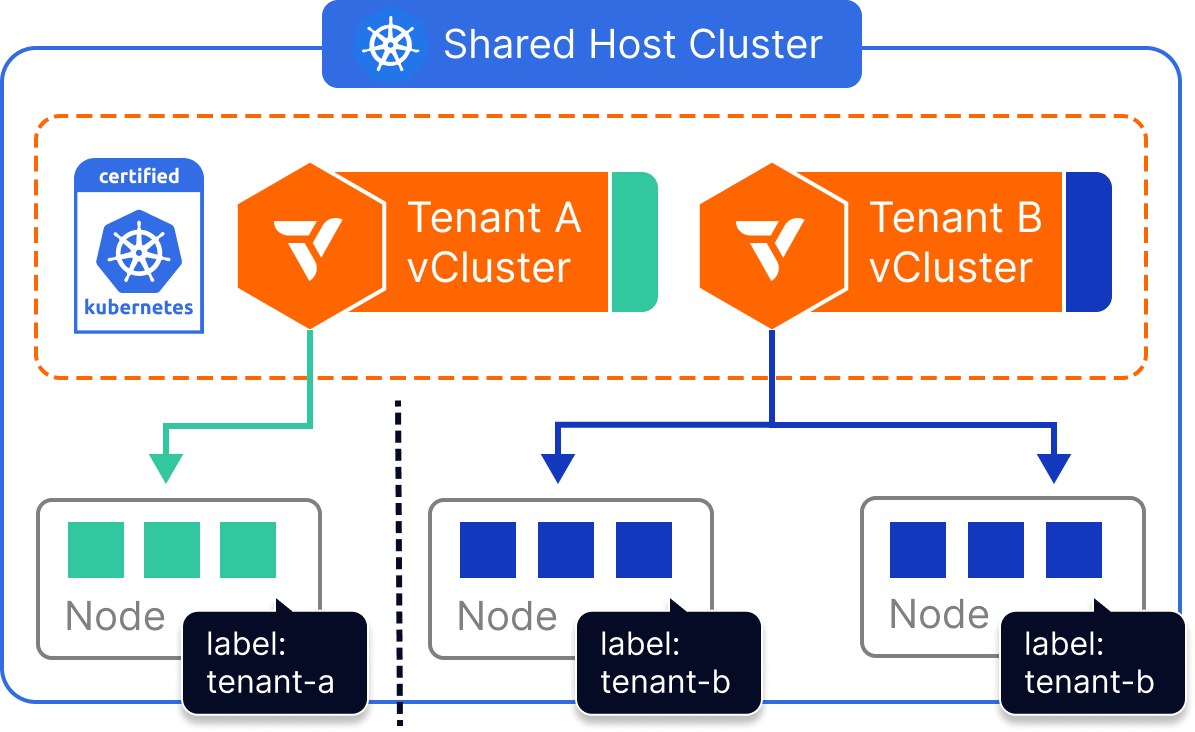
Dedicated Nodes strike a balance between hard separation and infrastructure efficiency, but require thoughtful governance and policy design.
| Dimension | Isolation Level |
|---|---|
| Control Plane | ✅ Isolated via vCluster |
| Network | 🔶 Shared (requires policies) |
| Node/Compute | ✅ Dedicated by label |
| RBAC/Namespace | ✅ Scoped within vCluster |
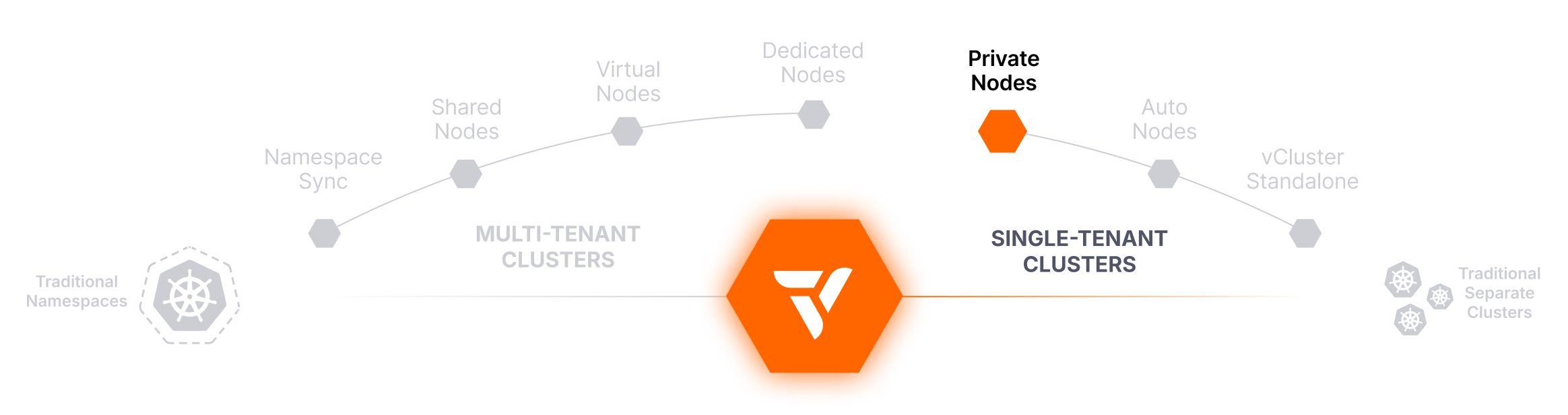
Dedicated Nodes Per Tenant, with Separate CNI, CSI, and Compute
Private Nodes provide the strongest isolation among vCluster tenancy models. Each tenant cluster gets its own worker nodes. Nodes join explicitly through a token-based enrollment script, then connect to the tenant’s control plane over a WireGuard tunnel. There is no cross-tenant scheduling, and each tenant gets a separate CNI and separate storage.
The tenant’s control plane runs on the Control Plane Cluster you already operate, so you get a hard node and kernel boundary per tenant without provisioning and managing a separate Kubernetes cluster for each one. From the tenant’s perspective, the environment behaves like a single-tenant Kubernetes cluster with all platform services isolated.
No tenant shares compute, networking, or storage with another. This is the model for workloads that require strict compliance or regulatory boundaries, and for any tenant you cannot place behind a shared kernel.
Each tenant cluster is assigned its own worker nodes. A node is enrolled by running a join script that installs the node components and establishes a WireGuard tunnel back to that tenant’s control plane. The CNI, CSI, kube-proxy, and other node-level components are isolated per tenant.
From the Control Plane Cluster, a worker node that joined a tenant cluster is not visible as a Kubernetes node. No operator on the Control Plane Cluster can inspect that tenant’s workloads through the Kubernetes API. Tenants cannot interfere with one another at any layer, from API server down to the node kernel, while still keeping the benefits of the tenant cluster abstraction such as fast provisioning, CRD freedom, and sleep mode.
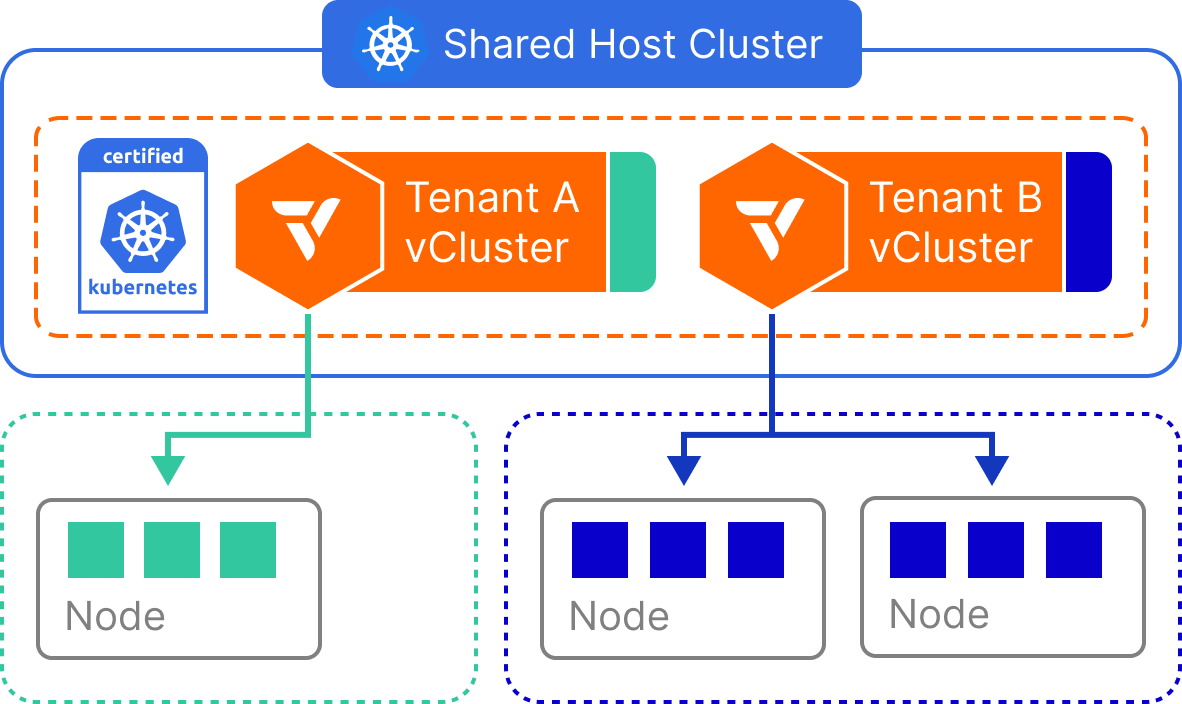
This model is ideal when tenant safety and independence are more important than resource efficiency.
| Dimension | Isolation Level |
|---|---|
| Control Plane | ✅ Dedicated per tenant |
| Network | ✅ Separate CNI |
| Node/Compute | ✅ Dedicated nodes and kernel per tenant |
| RBAC/Namespace | ✅ Scoped within isolated vCluster |
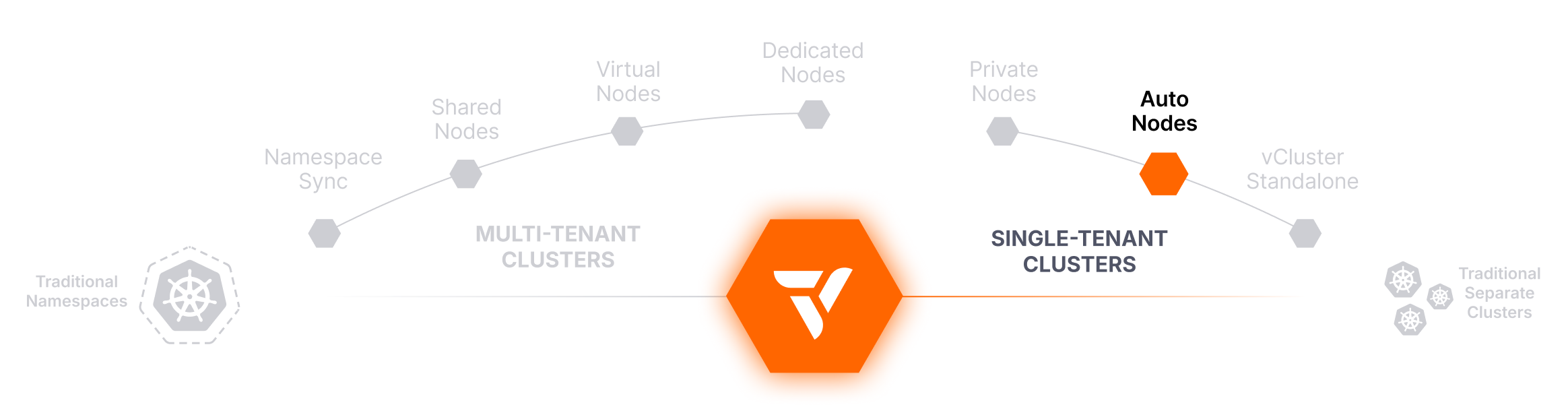
Dynamic Node Autoscaling, Anywhere You Run Kubernetes
Unlock cloud-style elasticity across tenant clusters in public cloud, private cloud, and bare metal with embedded Karpenter.
Auto Nodes is a node lifecycle capability rather than an isolation model in its own right. It is how nodes arrive and leave, and it pairs with the worker node model you have already chosen. Auto Nodes integrates a managed instance of Karpenter directly inside each tenant cluster, transforming it into a fully isolated autoscaling unit. With dynamic provisioning and deprovisioning of compute across hybrid, multi-cloud, and even bare metal environments, platform teams can now scale workloads elastically, without over-provisioning or vendor lock-in.
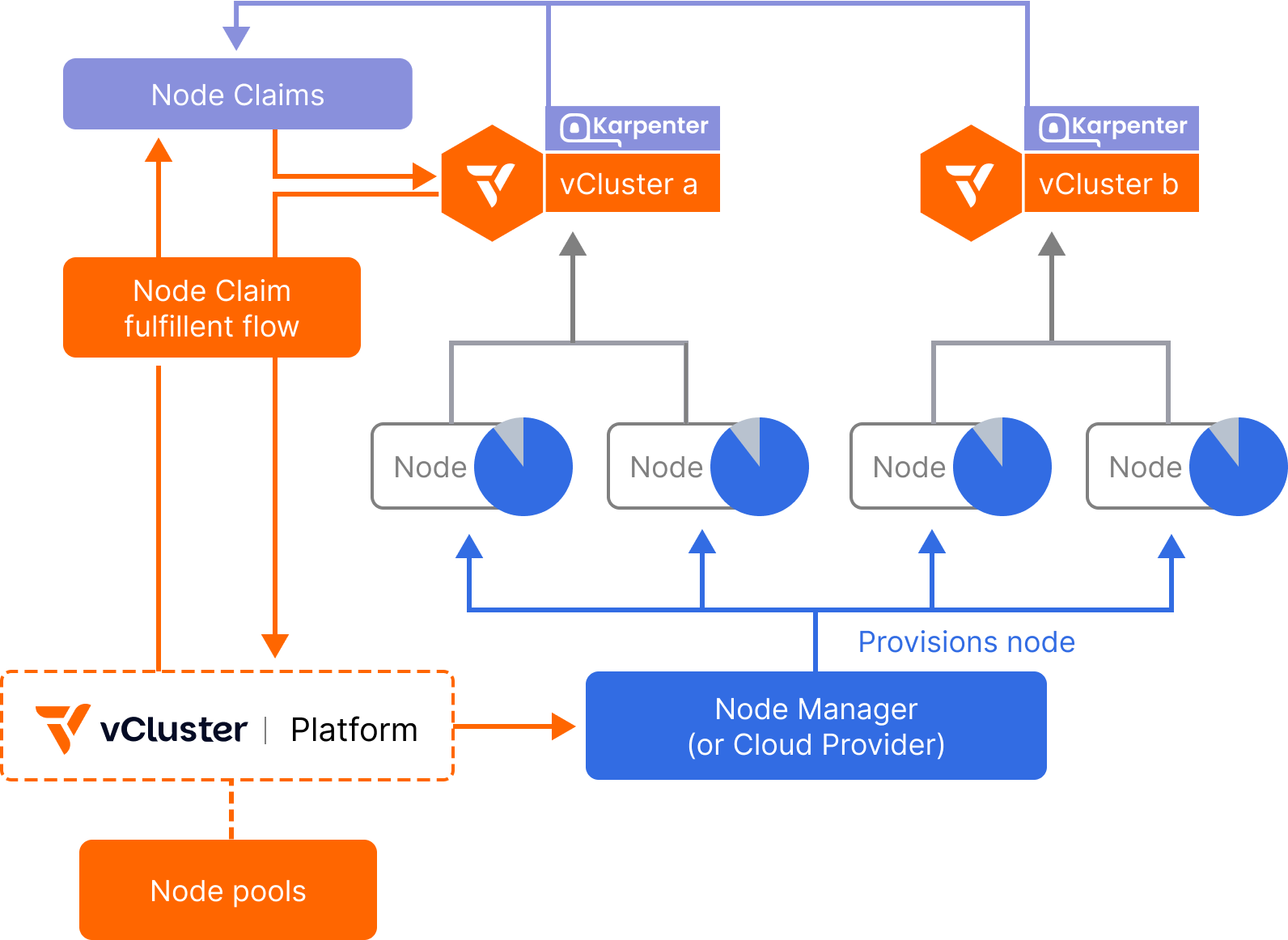
Each tenant cluster can trigger the creation of NodeClaims, which the platform fulfills by dynamically scaling up the appropriate node pool, whether that means launching traditional cloud VMs, bare metal PXE-booted nodes, or virtualized environments like vNode or KubeVirt. Underutilized nodes are automatically drained and returned to the shared pool, improving efficiency and reducing cloud spend.
The vCluster Platform runs an embedded, fully configurable instance of Karpenter that listens to scheduling pressure and provisioning needs from all connected tenant clusters. When a tenant cluster’s scheduler detects the need for more compute (e.g., due to a pending pod), it submits a NodeClaim to the platform.
The platform’s Node Manager fulfills these claims by selecting from available Node Pools, each defined by a set of instance types, node classes, or backing infrastructure (e.g., GPU, ARM, x86, bare metal). Nodes are joined dynamically and assigned to the requesting tenant cluster.
Once the workload completes or scales down, unused nodes can be automatically removed, rebalanced, or reused by other tenant clusters.
Despite these, the payoff is massive in terms of scalability, efficiency, and automation.
| Dimension | Isolation Level |
|---|---|
| Control Plane | ✅ Works with all isolated vCluster modes |
| Network | 🔶 Shared unless backed by private infra |
| Node/Compute | ✅ Nodes provisioned on-demand per cluster |
| RBAC/Namespace | ✅ Managed via the requesting vCluster |
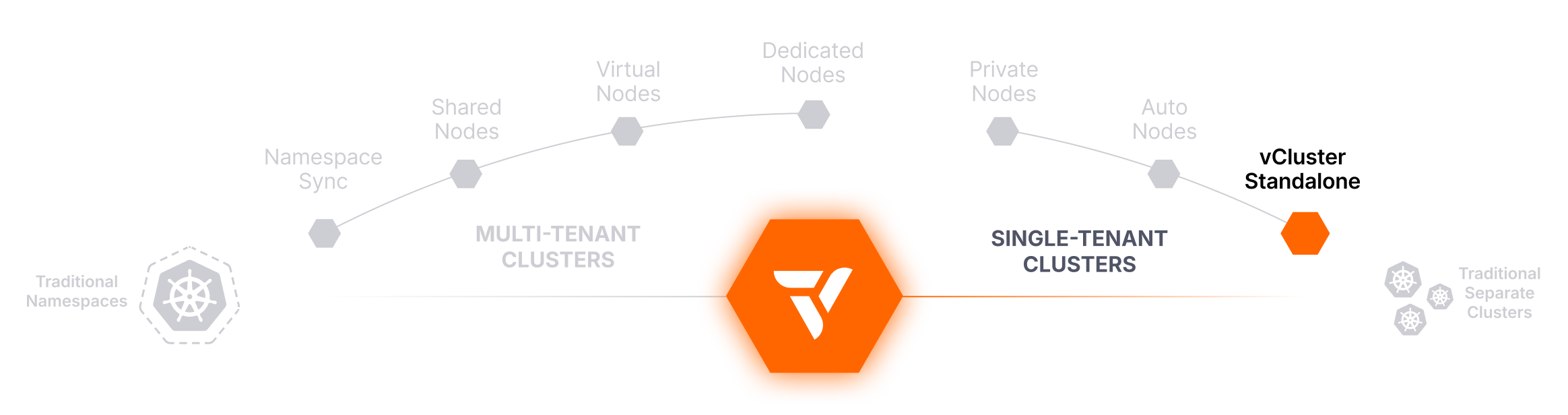
Run Kubernetes on Your Own Metal, with No Parent Cluster Underneath
vCluster Standalone is a complete Kubernetes distribution that runs as a self-contained binary on bare metal or VMs, with no dependency on any other Kubernetes distribution. There is no Control Plane Cluster underneath it.
This is the model when you are building a Kubernetes platform from your own hardware up rather than layering on an existing cluster. You bootstrap a Control Plane Cluster and install Platform in one pass, then provision tenant clusters on top using whichever worker node model each environment needs.
If what you want is a throwaway cluster on a laptop or in CI, that is Docker (vind), covered in the next section, not Standalone.
Standalone runs as a self-contained binary on bare metal or VMs. It brings its own control plane components and does not require any Kubernetes cluster to exist first, which makes it the bottom layer of a stack rather than a layer on top of one.
It behaves like a regular Kubernetes control plane: custom resources, RBAC, workload scheduling, and CI/CD integrations all work as expected. Once Standalone and Platform are running, tenant clusters are provisioned on top of it with shared, dedicated, or private nodes depending on who the tenants are.
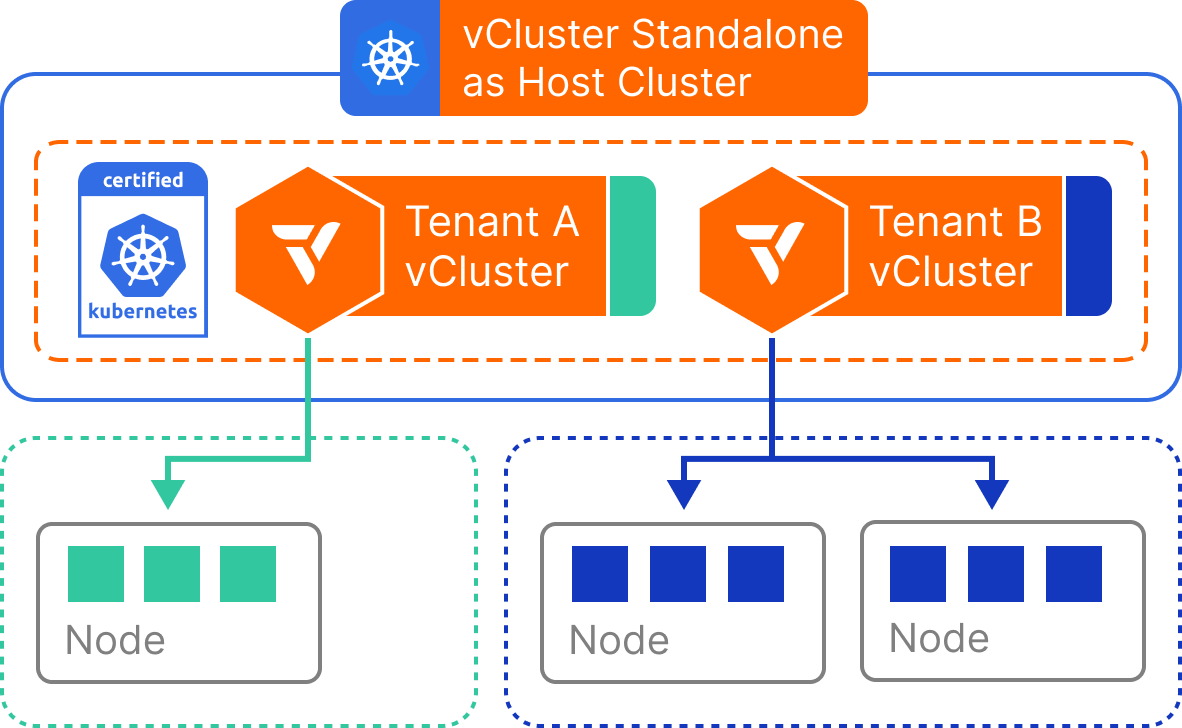
Standalone is the right choice when the bottom of the stack needs to be yours, and unnecessary work when it does not.
| Dimension | Isolation Level |
|---|---|
| Control Plane | ✅ Fully isolated |
| Network | ✅ Self-contained |
| Node/Compute | ✅ Self-contained runtime |
| RBAC/Namespace | ✅ Fully scoped within standalone setup |
A Complete Tenant Cluster on One Docker Host
vind runs a complete tenant cluster entirely in Docker containers, with no Kubernetes dependency at all. The control plane and worker nodes run as containers on a single Docker host, which makes it the fastest way to get a real cluster in front of a developer or a CI job.
vind starts the tenant cluster’s control plane and its worker nodes as containers on one machine. Because everything is local, startup is measured in seconds and teardown is complete. There is no Control Plane Cluster and no cloud infrastructure involved.
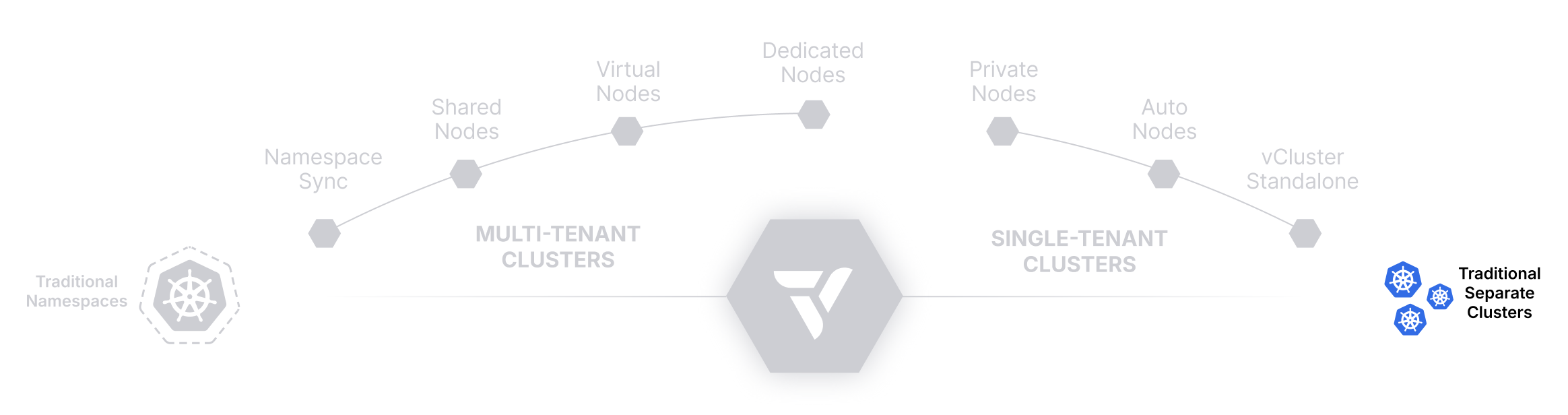
Provision a Cluster Per Tenant: Strong Isolation, Heavy Overhead
The traditional method for tenant separation. Offers full control and security at the cost of complexity, duplication, and scalability challenges.
Provisioning a fully separate Kubernetes cluster for each tenant is the most well-understood and straightforward form of multi-tenancy. Every tenant gets their own separate cluster, including a dedicated control plane, node pool, and platform services like CNI, CSI, monitoring, and logging.
While this model offers the strongest isolation guarantees, it comes with substantial operational and financial cost. It often leads to cluster sprawl, duplicated effort across environments, and growing platform complexity as the number of tenants increases. This approach remains common in regulated industries and traditional enterprise settings, but it is increasingly being replaced by more scalable, efficient alternatives, like vCluster.
Each tenant receives its own Kubernetes cluster, either provisioned manually or via infrastructure-as-code tools (e.g., Terraform, Cluster API, cloud-native APIs). All cluster resources are isolated by design: tenants cannot interact with each other, and workloads are scheduled to entirely separate compute environments.
This isolation extends beyond compute, since each tenant also gets independent CRDs, webhooks, admission controllers, and control plane components. But because every cluster runs the full stack of infrastructure services, the cost and complexity increase linearly with the number of tenants.
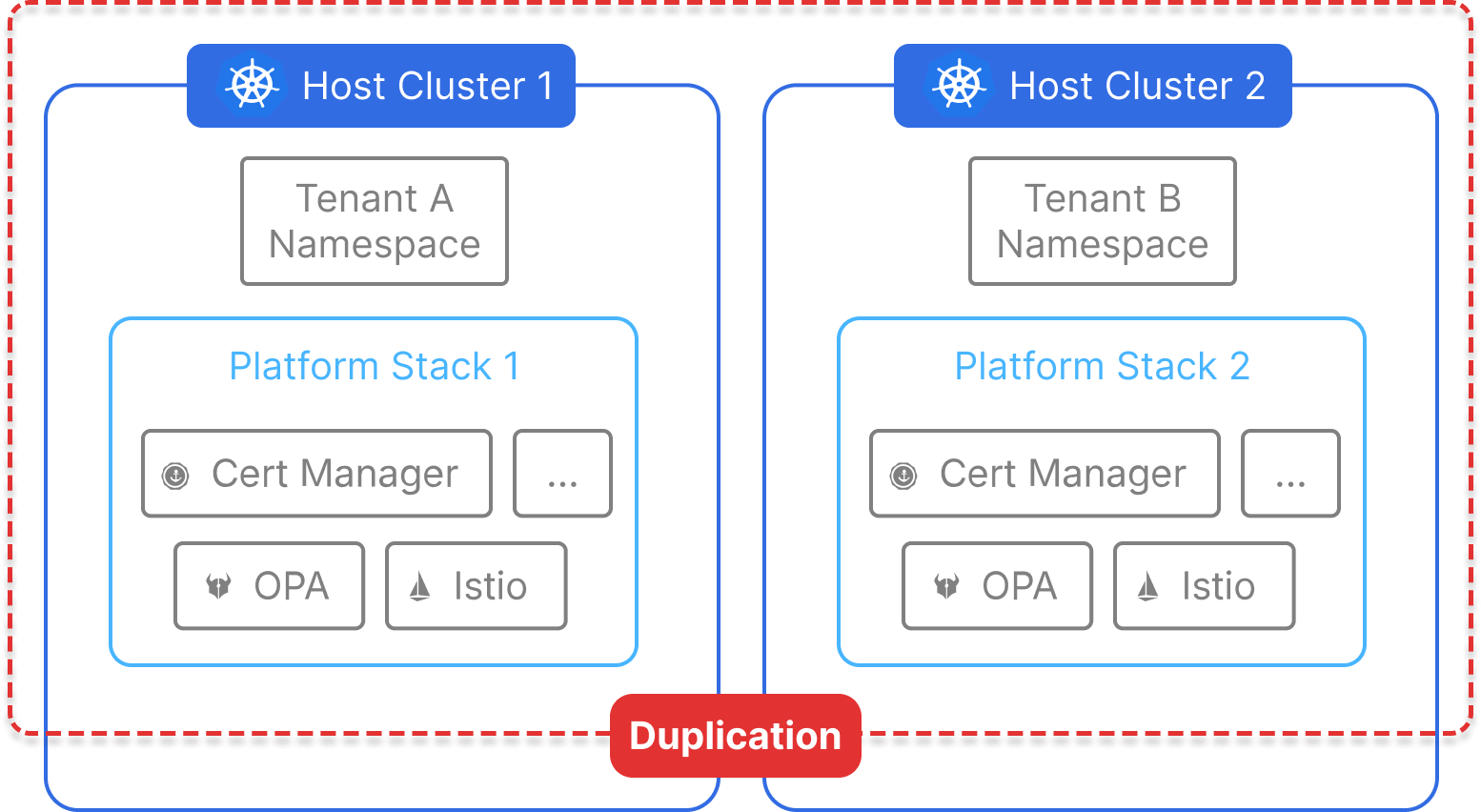
While this model works for high-security workloads, most teams can achieve similar benefits with less cost and complexity using vCluster.
| Dimension | Isolation Level |
|---|---|
| Control Plane | ✅ Fully separate |
| Network | ✅ Fully separate |
| Node/Compute | ✅ Fully separate |
| RBAC/Namespace | ✅ Fully tenant-scoped |
There is no one-size-fits-all model for Kubernetes multi-tenancy, and with vCluster you do not have to pick just one. Run internal dev environments on shared nodes and production or customer-facing environments on private nodes, from the same platform and the same API, and move a tenant between models without changing what they see.
Start with Namespace Syncing or Shared Nodes for trusted tenants. Move to Private Nodes when a tenant is external, resold, regulated, or otherwise untrusted. Use vNode where you need a kernel boundary without dedicating nodes, and Auto Nodes to keep infrastructure efficient at every step.
And when you’re ready to abstract away the Kubernetes learning curve entirely, vCluster gives you the tools to build a seamless internal platform with fast, secure, tenant-aware clusters at its core.
Start with the trust question. Everything after it is optimization.
Ready to see it in action? Try vCluster today →
| Category | K8s | vCluster | K8s | ||||||
|---|---|---|---|---|---|---|---|---|---|
| Traditional Namespaces | Namespace Syncing | Shared Nodes | vNode | Dedicated Nodes | Private Nodes | Standalone | Docker (vind) | Traditional Separate Clusters | |
| Control Plane Isolation | 🔴 None | 🟡 Partial (API-only) | 🟢 Full | 🟢 Full | 🟢 Full | 🟢 Full | 🟢 Full | 🟢 Full | 🟢 Full |
| Network Isolation | 🔴 Requires policies | 🔴 Requires policies | 🔴 Requires policies | 🟡 Soft isolation | 🔴 Requires policies | 🔴 Requires policies | 🟢 Strong | 🟢 Self-contained | 🟢 Strong |
| Node Isolation | 🔴 None | 🔴 None | 🔴 None | 🟢 Kernel-level (vNode) | 🟡 Scoped by label | 🟢 Dedicated nodes | 🟡 Depends on node model | 🟡 Container-level | 🟢 Dedicated nodes |
| Resource Quota Granularity | 🟡 Namespace-level | 🟡 Namespace-level | 🟢 vCluster-level | 🟢 vCluster-level | 🟢 vCluster-level | 🟢 vCluster-level | 🟢 Cluster-level | 🟢 Cluster-level | 🟢 Cluster-level |
| Provisioning Overhead | 🟢 Very low | 🟢 Very low | 🟢 Low | 🟢 Low | 🟡 Medium | 🟡 Medium-high | 🔴 High | 🟢 Very low | 🔴 Very high |
| Dev Autonomy | 🔴 Minimal | 🟡 Moderate | 🟢 High | 🟢 High | 🟢 High | 🟢 High | 🟢 High | 🟢 High | 🟢 High |
| Best for Dev/Test Envs | 🟢 Basic testing | 🟢 Pipelines & API sync | 🟢 Shared environments | 🟢 Lightweight clusters | 🟡 Segmented by nodes | 🟡 Isolated via node pool | 🔴 Not ideal | 🟢 Ideal | 🔴 Not ideal |
| Best for Prod Workloads | 🔴 Not recommended | 🔴 Rarely used | 🟡 Trusted tenants only | 🟡 Valid | 🟢 Recommended | 🟢 Strong isolation | 🟢 Enterprise ready | 🔴 Not intended | 🟢 Enterprise standard |
| Cost Efficiency | 🟢 Excellent | 🟢 Excellent | 🟢 Excellent | 🟡 High | 🟡 Balanced | 🟡 Medium | 🟡 Fair | 🟢 Excellent | 🔴 Poor |
| Security Isolation | 🔴 Weak | 🔴 Weak | 🟡 Policy-based | 🟡 Soft | 🟢 Controlled | 🟢 Strong | 🟢 Strict | 🔴 Single host | 🟢 Strict |
| Kubernetes Overhead | 🟢 Very low | 🟢 Very low | 🟢 Low | 🟡 Moderate | 🟡 Moderate | 🟡 Higher | 🔴 High | 🟢 Very low | 🔴 Very high |
| Multi-Tenancy Suitability | 🔴 Basic only | 🟡 Good | 🟡 Trusted tenants only | 🟢 Strong | 🟢 Excellent | 🟢 Excellent | 🟢 Supported | 🔴 Local use only | 🔴 Not ideal |
| Kernel Isolation | 🔴 Shared | 🔴 Shared | 🔴 Shared | 🟢 Per tenant (user namespaces) | 🔴 Shared kernel, exclusive nodes | 🟢 Per tenant | 🟡 Depends on node model | 🔴 Shared (single host) | 🟢 Per tenant |
| Safe for Untrusted Tenants | 🔴 No | 🔴 No | 🔴 No | 🔴 No (use private nodes) | 🔴 No | 🟢 Yes | 🟡 Depends on node model | 🔴 No | 🟢 Yes |
Deploy your first virtual cluster today.
