GPU on Kubernetes: Safe Upgrades, Flexible Multitenancy
Oct 22, 2025
|
5
min Read
In today’s cloud-native landscape, GPU workloads are becoming increasingly critical. From training large language models to running inference APIs, organizations are investing heavily in GPU infrastructure. But with this investment comes a challenge: how do you safely test and deploy new GPU schedulers without risking your entire production environment?
Let me paint a picture of what most teams face today. You’re running a Kubernetes cluster with precious GPU resources. Multiple teams depend on these GPUs for everything from model training to real-time inference. Your current scheduler works, but you’ve heard about NVIDIA’s KAI Scheduler and its promise of fractional GPU allocation and better resource utilization.
The problem? Testing a new scheduler in production is like changing the tires while the car is still moving, one mistake and everything stops working.
Before we dive into the solution, let’s understand what actually runs on GPUs in modern infrastructure:
Notice something? Most workloads don’t use 100% of a GPU all the time. Yet traditional Kubernetes scheduling treats GPUs as indivisible resources. This is where KAI Scheduler shines — but how do you test it safely?
In January 2025, NVIDIA open-sourced their KAI (Kubernetes AI) Scheduler, bringing enterprise-grade GPU management to the community. It’s an advanced Kubernetes scheduler designed specifically for GPU workload optimization.
KAI ensures maximum utilization without causing collisions.
Here’s the reality of upgrading any Kubernetes shared components, including schedulers, in production:
Current challenges:
There are several failure modes.
According to New Relic’s 2024 data, enterprise downtime costs between $100k-1M+ per hour. Can you afford to take that risk?
vCluster creates a fully functional Kubernetes cluster inside a namespace of your existing cluster. It’s not a new EKS cluster or GKE cluster — it’s a virtual cluster running inside your current infrastructure.
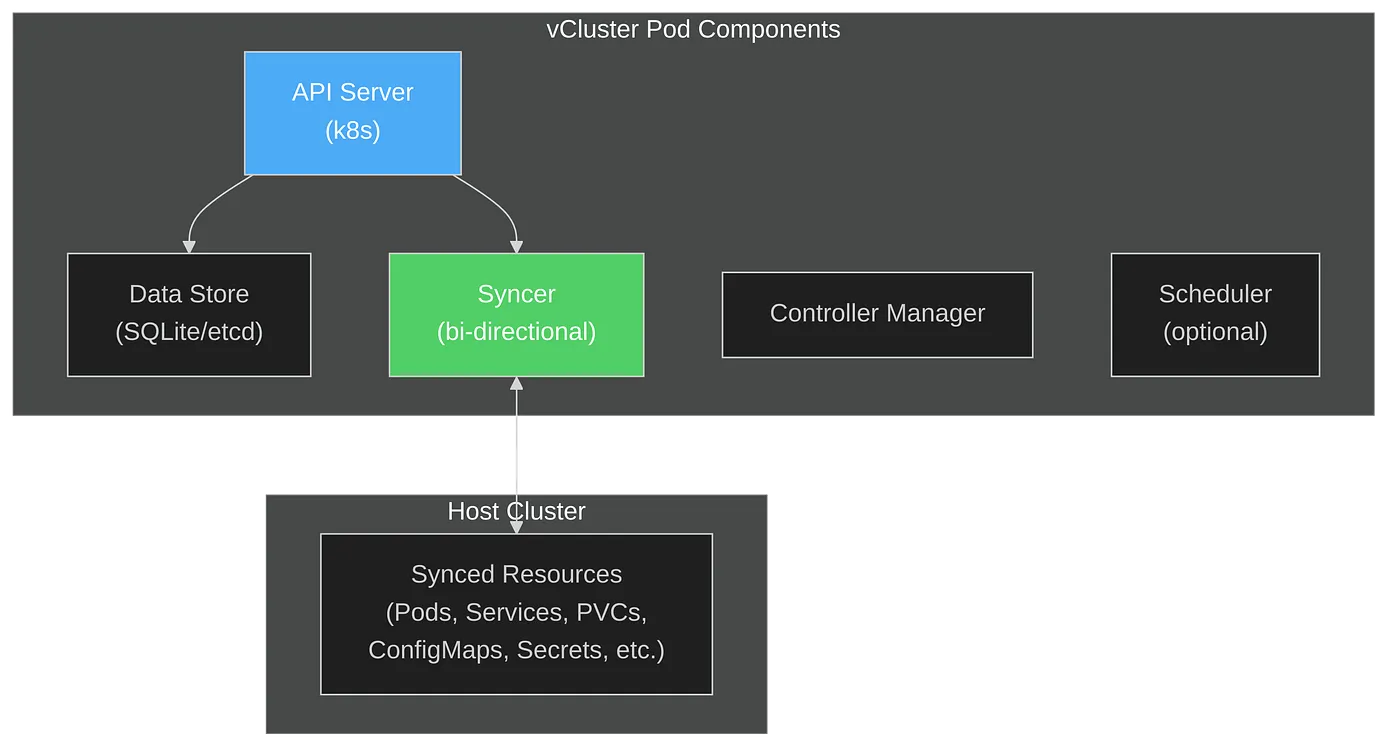
The architecture consists of these components:
This architecture enables running a Kubernetes cluster inside Kubernetes, with strong isolation but shared underlying resources.
The syncer is the component that makes vCluster work seamlessly. It’s responsible for:

This means your GPU workloads scheduled by KAI inside the vCluster actually run on real GPU nodes in your host cluster, but all scheduling decisions are isolated.
Here’s how you can safely test KAI Scheduler without risking production:
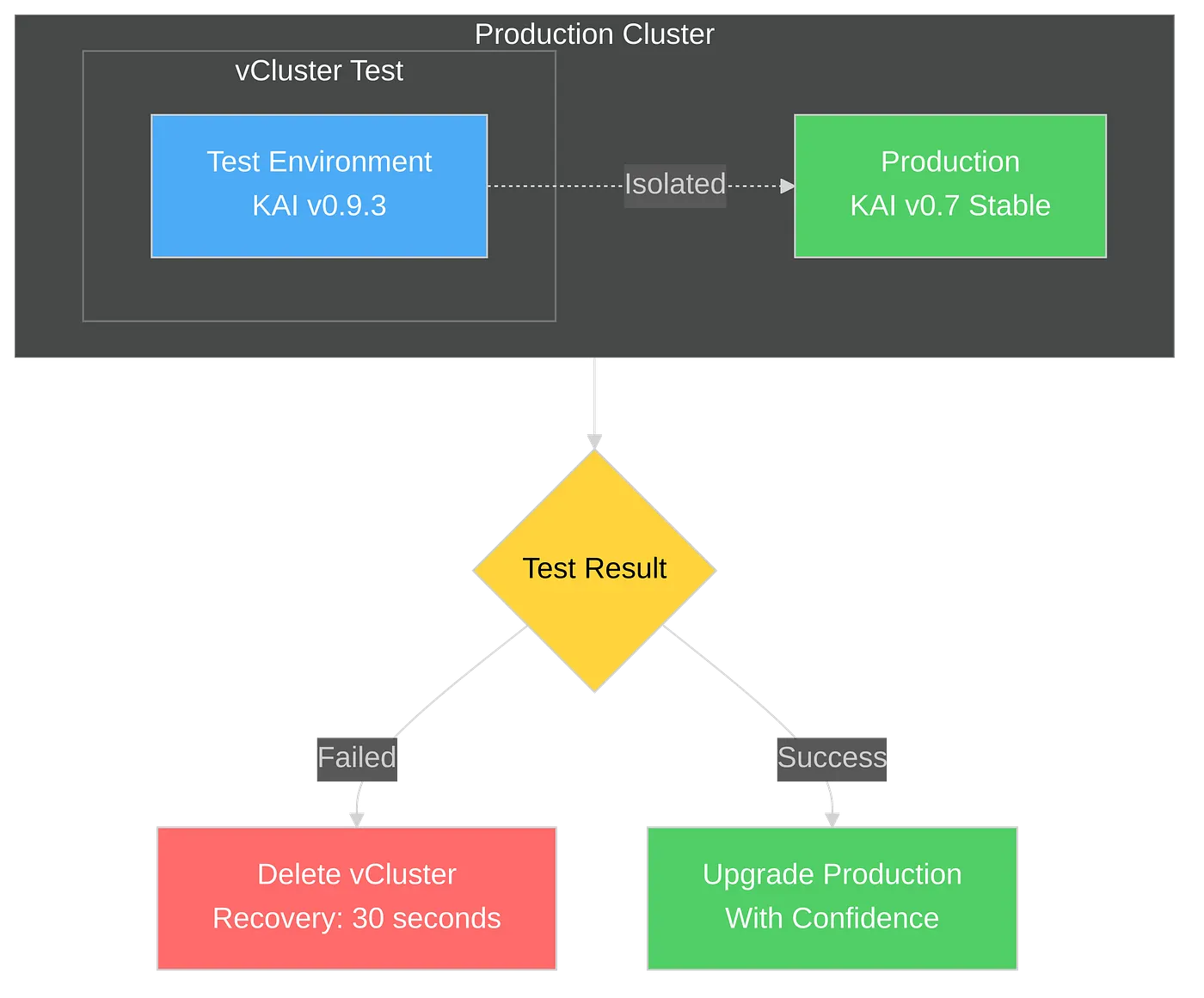
The workflow:
Consider this scenario: ML team wants to test KAI v0.9.3 for its new features, while your Research team requires the stable v0.7.11 version. With traditional approaches, teams must coordinate, wait, and compromise on a single version.
With vCluster, each team operates their own virtual cluster with their own KAI scheduler version, providing complete autonomy without interference.
Parallel scheduler deployments: Architecture benefits:
Each team can iterate at their own pace, test different configurations, and only promote to production when they’re confident.
Based on typical enterprise deployment scenarios, here’s what you can achieve:
Time savings:
Risk reduction:
Want to try this approach? I’ve created a complete hands-on guide with all the technical details, configurations, and scripts you need:
Technical Resources:
The guide includes:
The combination of vCluster and NVIDIA KAI Scheduler makes it less error-prone and helps with how we can approach GPU workload management in Kubernetes. Instead of choosing between innovation and stability, you can have both.
vCluster provides the safety net that enables rapid experimentation. KAI Scheduler provides the advanced GPU management capabilities modern workloads demand. Together, they enable you to:
Deploy your first virtual cluster today.
