How to Assign vCluster to Specific Nodes Using Node Selectors

Jan 16, 2025
|
2
min Read

When deploying a vCluster, you might need to ensure it runs on specific nodes, such as GPU-enabled nodes or production-specific nodes. This can be achieved using node selectors, which limit the scheduling of the vCluster control plane pods to nodes with specific labels.
To schedule your vCluster control plane on nodes labeled environment=GPU, use the following configuration in your Helm chart:
controlPlane:
  statefulSet:
    scheduling:
      nodeSelector:
        environment: GPU
This ensures that the vCluster control plane only runs on nodes labeled with environment=GPU.
You can go to the Killercoda Kubernetes playground
Command:
curl -L -o vcluster "https://github.com/loft-sh/vcluster/releases/latest/download/vcluster-linux-amd64" && sudo install -c -m 0755 vcluster /usr/local/bin && rm -f vcluster
Command:
cat <<EOF > demo.yaml
controlPlane:
  statefulSet:
    scheduling:
      nodeSelector:
        environment: GPU
EOF
Let’s Label the node
Command:
kubectl label node controlplane environment=GPU
Output:

Command:
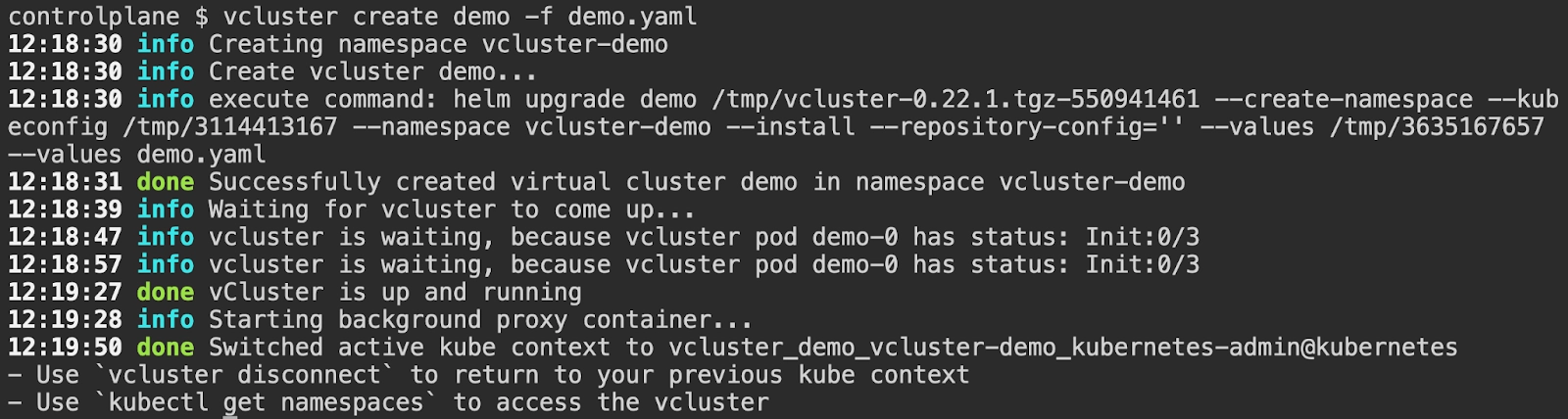
vcluster create demo -f demo.yaml
Output:
Let’s Verify
Command:
kubectl config use-context kubernetes-admin@kubernetes
kubectl get pods -n vcluster-demo -owide
Output:

As you can see above, the stateful set for the vCluster created landed on the node names controlplane and this was the node where we set up the label. This is how you can assign vCluster to a specific node and if you want to do that for the pods within the vCluster too, you can follow the documentation here.
Deploy your first virtual cluster today.
